Build a Local Knowledge Base (RAG) with Ollama and Open WebUI or AnythingLLM
Handing your company policies, product manuals, papers or personal notes to a model and asking it to answer “from the material” is one of the most practical things a local LLM can do. The technique is called retrieval-augmented generation, or RAG. This guide shows how to set up a local knowledge base: first the parts of a RAG system, then a step-by-step setup with Ollama and Open WebUI, then the alternative route with AnythingLLM. Models and vectors stay on your machine, so nothing needs to go to an online service. If Open WebUI is not installed yet, read our Open WebUI setup guide first, and for Ollama see the Ollama install guide.
Verification note: Open WebUI’s embedding settings, its re-index requirement and its context-length warning come from the official Open WebUI docs (docs.openwebui.com, read 2026-10-30). AnythingLLM’s built-in vector store and embedder come from its official documentation, and Ollama’s default context comes from Ollama’s docs. Interface labels change between versions, so go by what your version shows. We did not evaluate retrieval quality and quote no accuracy figures.
Key takeaways (Updated 2026-10-30)
- RAG needs two models: an embedding model to find, and a chat model to answer.
Re-index after changing the embedding model; in Open WebUI enter nomic-embed-text without an ollama/ prefix.
Below 24GiB of VRAM Ollama defaults to a 4096-token context, so raise it to 8192 or more for RAG.
Local Knowledge Base: Understand the Four Parts of RAG
A model’s training data does not include your internal material, so asking it directly gives generic answers or inventions. RAG fixes that by retrieving the relevant material first and handing it to the model with the question. A local RAG system has four parts:
| Part | Job | Common choices |
|---|---|---|
| Parsing and chunking | Split PDFs, Word files and web pages into small pieces | Built into Open WebUI and AnythingLLM |
| Embedding model | Turn each piece of text into a list of numbers (a vector) | nomic-embed-text, mxbai-embed-large, a built-in small model |
| Vector store | Store vectors and search by similarity | LanceDB in AnythingLLM, a built-in store in Open WebUI |
| Generation model | Read the retrieved text and write the answer | A local chat model such as Qwen, Gemma or gpt-oss |
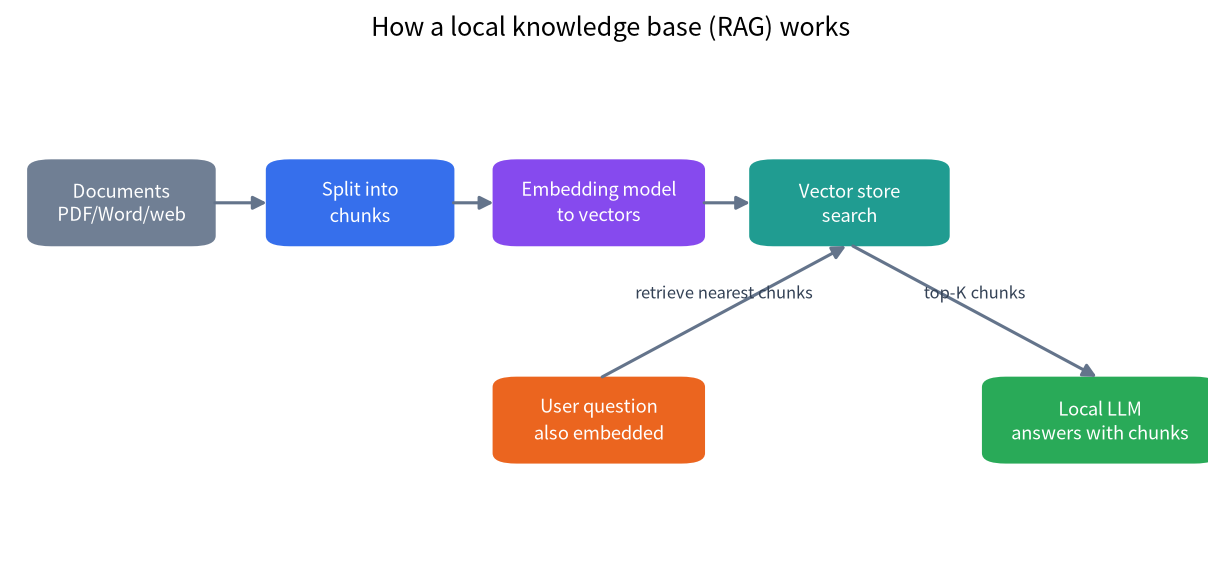
Two points matter most. First, the embedding model and the generation model are two different models: one finds, the other speaks, so you need both. Second, vectors only match the embedding model that made them, so if you change the embedding model you must re-index, or retrieval becomes meaningless.
Option One: Ollama Plus Open WebUI
This is the most common pairing and suits anyone already on Ollama.
Step 1: Pull an Embedding Model and a Chat Model
ollama pull nomic-embed-text
ollama pull qwen3:8b      # chat model; swap in whatever fits your VRAM
For the chat model, use the VRAM-tier advice in our best local LLM guide. Embedding models are small; community tutorials cite about 274MB for nomic-embed-text, which puts almost no pressure on VRAM.
Step 2: Set the Embedding Model in Open WebUI
Following the Open WebUI docs and community tutorials, go to Admin Panel, then Settings, then Documents:
- Set the Embedding Model Engine to Ollama.
- Enter
nomic-embed-textas the embedding model, without anollama/prefix, or you will get a “model not found” error. - If Open WebUI runs in Docker, the Ollama address usually has to be
http://host.docker.internal:11434; connection troubleshooting is in the Open WebUI setup guide. - Save.
In the official embedding recommendations, a single user getting started can keep the default all-MiniLM-L6-v2, which runs locally with no setup. For multi-user setups with Ollama available, nomic-embed-text through Ollama moves the embedding work to Ollama and eases Open WebUI’s memory use. For air-gapped systems, nomic-embed-text or mxbai-embed-large through Ollama need no external API calls.
Step 3: Create a Knowledge Base and Upload Documents
- Go to Workspace, then Knowledge, click Create, enter a name and description, and choose the access permissions.
- Click “+” to upload files or add text content.
- Start a new chat, click “+” and choose to attach the knowledge base, or type
#in the prompt box and pick it. - Ask something only your material can answer, and check that the reply draws on retrieved passages.
Step 4: Raise the Context Length, the Step Everyone Forgets
The Open WebUI docs give a pointed warning: Ollama picks a default context length from your VRAM, and below 24GiB that default is only 4096 tokens. That seriously limits RAG, because the retrieved content may not fit or may only be partly read. The docs advise editing your Ollama model under Admin Panel, then Models, and raising the context length in Advanced Params to 8192 or more, ideally above 16000.
A quick calculation shows why. If each retrieved chunk is 600 tokens, taking the top 8 chunks costs 4800 tokens. That already exceeds 4096 before you count the question, the system prompt and the answer.
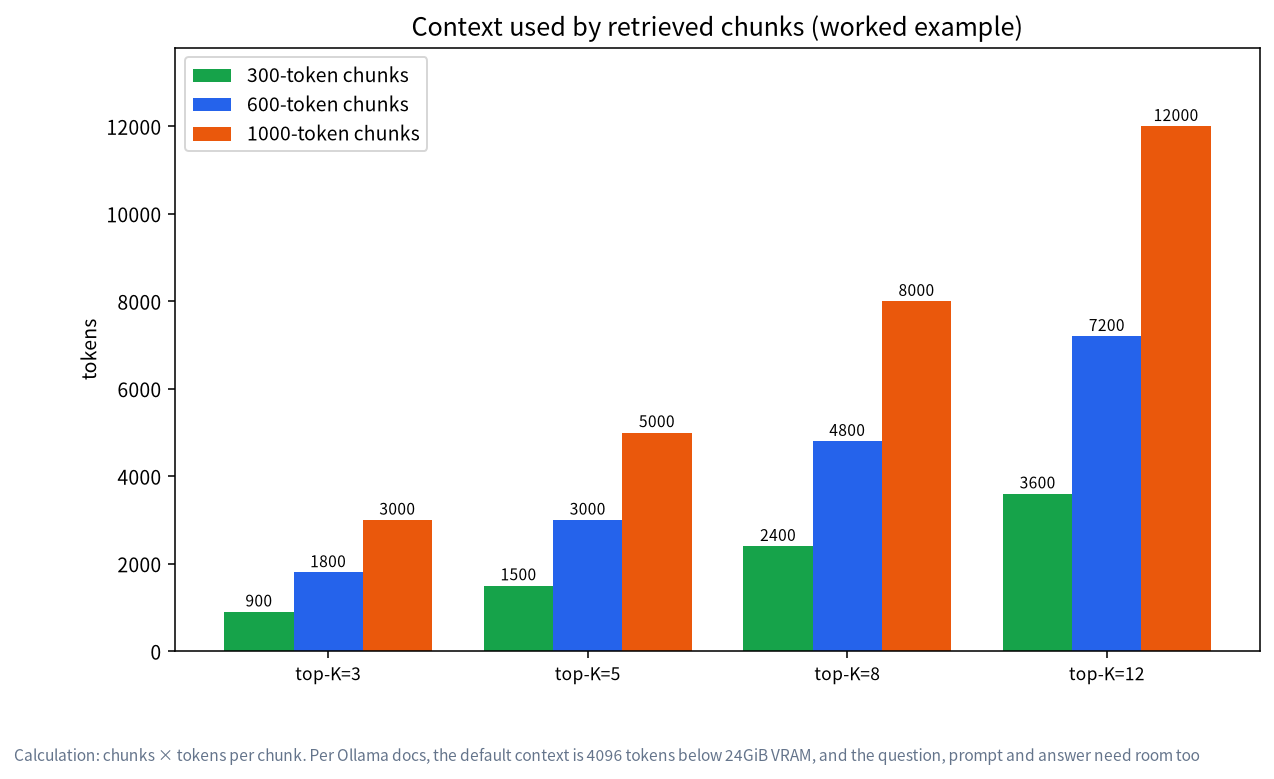
A bigger context also enlarges the KV cache, which eats VRAM. Our VRAM calculator guide explains the sums, and if you have a 24GB card, our 24GB VRAM guide discusses the headroom.
Option Two: AnythingLLM
If you would rather avoid Docker, the AnythingLLM desktop app is the easier road. According to its documentation:
- It ships with a private built-in vector database powered by LanceDB, and with the default option your vectors never leave AnythingLLM.
- The embedding model has a built-in default, and can be switched to local sources such as Ollama or LM Studio, or cloud sources such as OpenAI.
- Besides the built-in LanceDB, it supports local vector databases such as PGVector, Chroma and Milvus, and cloud ones such as Pinecone.
It organises documents by workspace: create a workspace, upload documents, embed them into the workspace, then ask questions in its chat. The LLM setting can point at Ollama or LM Studio. For a fully offline setup, keep the built-in vector store and a local embedder, and point the language model at your own Ollama.
| Aspect | Open WebUI | AnythingLLM |
|---|---|---|
| Installation | Usually Docker | Desktop app or Docker |
| Multi-user and permissions | Yes, suits teams | Desktop is personal; Docker supports multiple users |
| Organisation | Knowledge bases attached in chat | Workspaces with documents bound to them |
| Embedding model | Default small local model; Ollama optional | Built-in default; Ollama and others optional |
| Best for | People already using Open WebUI | Individuals who want it to work out of the box |
Chunking and Retrieval: The Settings That Matter Most
Many people assume a bigger model fixes quality, but in RAG retrieval quality matters more:
- Chunk size and overlap: too small loses context, too large lets each retrieval eat too many tokens. One community tutorial raised chunk size to 3000 and overlap to 100 for long documents, but there is no universal number, so test on your own documents.
- How many chunks to return (top-K): community tutorials for Open WebUI mention a small default number of top chunks, which you can raise, but it has to match your context length.
- Document quality: scanned PDFs need OCR, and tables and formulas often parse badly. Convert important files to clean text or Markdown first.
- Prompt template: telling the model to “answer only from the provided material and say so if it is not there” noticeably reduces invention.
- Re-index after changing the embedding model: the official docs repeat this.
A Sensible First Test Plan
Before you load hundreds of files, run a small test so you can tell whether a bad answer comes from retrieval or from the model:
- Start with three to five clean documents that you know well, so you can judge whether an answer is right.
- Write ten questions in advance: some whose answer sits in a single paragraph, some that need two documents, and a few that your material cannot answer at all.
- Ask each question and look at which passages were retrieved. If the right passage was not retrieved, the problem is chunking, the embedding model or the top-K setting. If the right passage was retrieved but the answer is still wrong, the problem is the chat model or a context that is too small.
- Change one setting at a time, such as chunk size, top-K or context length, and rerun the same ten questions. Changing several things at once makes it impossible to see what helped.
- Only then add the full document set, and re-index whenever you swap the embedding model.
This habit costs an hour and saves days of guessing, and it works the same in Open WebUI and AnythingLLM.
Privacy: What Stays on Your Machine
With a local model, local embeddings and a local vector store, your documents, vectors and questions are all processed on your machine. Check two things, though: whether web search, cloud embeddings or a cloud model has been switched on in Open WebUI or AnythingLLM, and whether you set the embedding model to a cloud API such as OpenAI. As long as every setting stays local, nothing has to be sent to an outside service. We will cover data flows in more detail in a dedicated privacy article.
Error and Troubleshooting Table
| Symptom | Likely cause | Fix |
|---|---|---|
| Upload fails with an embed 404 | The embedding model name has an ollama/ prefix, or the model was never pulled |
Enter nomic-embed-text and run ollama pull first |
| Replies do not cite your material | The knowledge base is not attached, or the context is too small | Attach it with # and raise the context |
| Off-topic answers after changing the embedding model | Old vectors do not match the new model | Re-index all documents in settings |
| Retrieved passages are irrelevant | Poor chunking or messy parsing | Adjust chunk size and clean the documents |
| Very slow replies | Huge context, or the model does not fit in VRAM | Use a smaller model; see our Ollama GPU guide |
A model running on the CPU is a common cause of slowness; see Ollama not using the GPU.
FAQ: Local Knowledge Bases
How big a GPU does a local knowledge base need?
Embedding models are tiny; the load comes from the chat model and the context. With 8GB of VRAM you can do small-scale Q&A with an 8B-class model if you keep context modest. With lots of material and long chunks, more VRAM is far more comfortable. Tier details are in our best local LLM guide.
How is RAG different from fine-tuning?
RAG retrieves material at answer time and hands it to the model, and you just re-index when the material changes. Fine-tuning changes the model’s parameters, which costs more and takes more skill. To make a model answer from documents, RAG is usually the first choice.
Do I have to re-index after changing the embedding model?
Yes. Vectors from different embedding models are not compatible, and the official docs say to re-index all documents after a change.
Are my documents uploaded to the cloud?
Not if the embedder, the vector store and the language model are all local options. Check that web search and cloud APIs are switched off before you rely on that.
Open WebUI or AnythingLLM?
For team sharing and permissions, pick Open WebUI. For a personal setup that works out of the box, pick the AnythingLLM desktop app. Both connect to Ollama, so you can try each.
Will it still make things up?
RAG reduces invention but does not eliminate it. Ask the model to answer only from the material, look at the passages it cites, and have a person check anything important.
Need Help Rolling It Out?
If you want a knowledge base for a team, or you are unsure what GPU your document volume needs, join the community or email admin@microaione.com with your document types and number of users. For the beginner route, read how to run an LLM locally.
References and further reading: Open WebUI: RAG docs, AnythingLLM docs: vector databases, Ollama: context length.