DeepSeek R1 Distill Sizes Explained: 1.5B, 7B, 8B, 14B, 32B and 70B by VRAM
When people say they run “DeepSeek R1” on a laptop, they almost never mean the 671-billion-parameter model that made the headlines. They mean one of the smaller DeepSeek R1 distill sizes: models from 1.5B to 70B parameters that were fine-tuned on reasoning data written by the big model. They are useful, but they are different models with different base families, and picking the wrong size wastes either your memory or your time. This guide explains what each size is, how big the downloads are on Ollama, why reasoning models need more context than chat models, and how to match a size to your VRAM. For the install steps, see our DeepSeek local deployment guide.
Verification note: Model families and licences come from the DeepSeek-R1 Hugging Face model card, and download sizes and the default tag from the Ollama library pages, all read on 2026-10-30. Memory totals are our own derivations from those sizes and KV cache sizes, not measurements. We quote no benchmark scores and make no claim about how close a distill gets to the full model.
Key takeaways (Updated 2026-10-30)
- The distills are fine-tuned versions of other open models: Qwen2.5 for 1.5B, 7B, 14B and 32B, Llama 3.1 8B and Llama 3.3 70B for the Llama ones, and on Ollama the default
deepseek-r1tag is an 8B model that the library page says was updated to DeepSeek-R1-0528-Qwen3-8B.Ollama lists these download sizes: 1.5B 1.1GB, 7B 4.7GB, 8B 5.2GB, 14B 9.0GB, 32B 20GB, 70B 43GB, while the full 671B model is 404GB.
Reasoning output is long, so budget context: our derived estimate puts the 32B distill at about 22GB with an 8K context and about 24GB at 16K, which is already tight on a 24GB card.
What a Distill Actually Is
The DeepSeek-R1 model card describes a family of models: the large mixture-of-experts DeepSeek-R1 with 671B total parameters, and a set of smaller dense models fine-tuned on about 800,000 samples curated with it. The card lists six distills and their base models: Qwen2.5-Math-1.5B, Qwen2.5-Math-7B, Llama-3.1-8B, Qwen2.5-14B, Qwen2.5-32B and Llama-3.3-70B-Instruct. In plain terms, someone took an existing small model and taught it to write long chains of reasoning like the big one. The result thinks out loud, which helps on maths and logic and makes answers slow to start and long.
Do not read the name as “a small DeepSeek-R1”. A distill has the architecture, strengths and weaknesses of its base model. The Qwen-based ones behave like Qwen models with a reasoning habit, and the Llama-based ones like Llama models. That is why the size alone does not decide quality; the base and the task matter too. Our best local models guide compares model families more broadly.
The Naming Trap on Ollama
On Ollama, ollama run deepseek-r1 does not download the 671B model. The library page shows that the latest tag is the same image as the 8B tag at 5.2GB, and its readme says the 8B distilled model was upgraded to DeepSeek-R1-0528-Qwen3-8B. That makes it different from the original Llama-based 8B on the Hugging Face card, so two articles that both say “R1 8B” may be talking about different models. If you need a specific version, pull an explicit tag such as deepseek-r1:14b and check the tag page for the digest and date. The full model is available as deepseek-r1:671b at 404GB, far beyond consumer hardware.
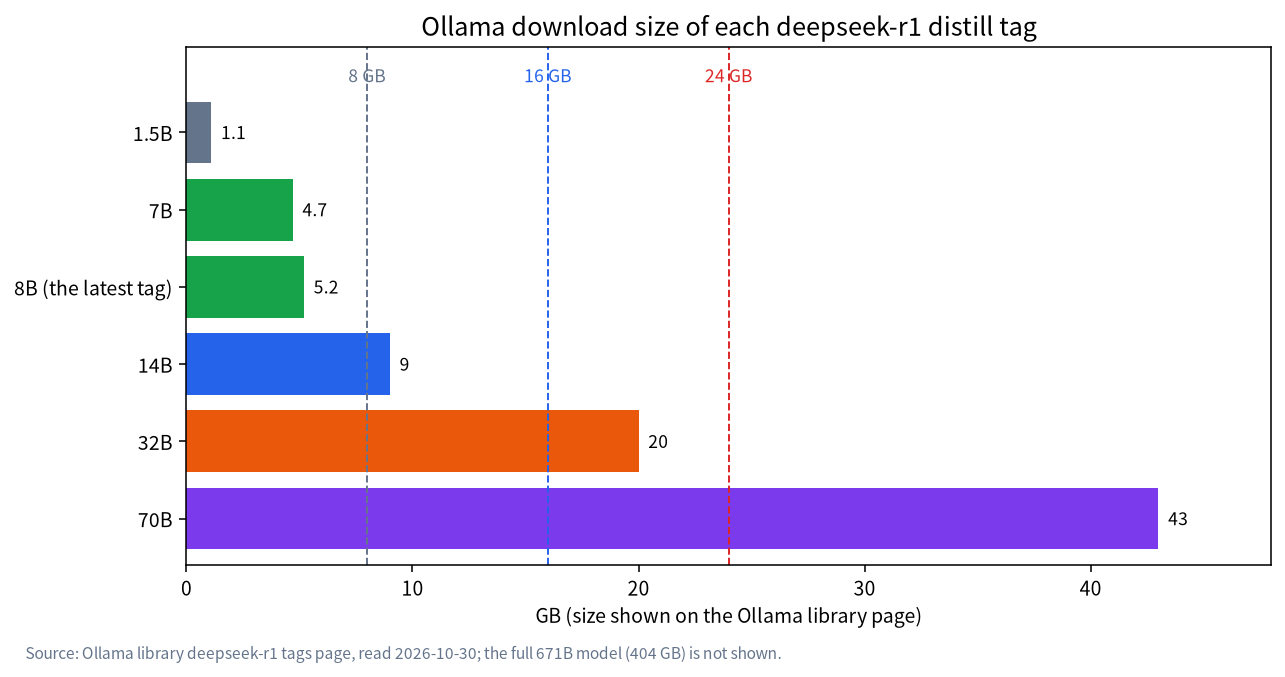
| Tag | Base family | Ollama size | Realistic hardware |
|---|---|---|---|
| 1.5b | Qwen2.5 Math | 1.1GB | Almost any machine |
| 7b | Qwen2.5 Math | 4.7GB | 8GB VRAM or modern CPU |
| 8b | Qwen3 (0528 update) | 5.2GB | 8GB to 12GB VRAM |
| 14b | Qwen2.5 | 9.0GB | 12GB to 16GB VRAM |
| 32b | Qwen2.5 | 20GB | 24GB VRAM, short context |
| 70b | Llama 3.3 | 43GB | 48GB or more, or large unified memory |
| 671b | DeepSeek-V3 base | 404GB | Server class |
Why Reasoning Models Need More Memory Than Their Size Suggests
A normal chat model answers in a few hundred tokens. A reasoning model first writes a long thinking section and then the answer, and the thinking can run to thousands of tokens on a hard question. Every token stays in the KV cache, so the memory use grows with the thinking. The model card says its evaluations set the maximum generation length to 32,768 tokens, which shows how long the output can get.
Using the KV sizes from our context length guide, f16 cache costs about 192KiB per token for the 14B (Qwen2.5-14B architecture), 256KiB for the 32B and 320KiB for the 70B. That makes the totals below, which include the Ollama weight sizes but exclude runtime overhead.
| Distill | Weights (Ollama) | Total at 8K context | Total at 16K context |
|---|---|---|---|
| 14B | 9.0GB | about 10.5GB | about 12GB |
| 32B | 20GB | about 22GB | about 24GB |
| 70B | 43GB | about 45.5GB | about 48GB |
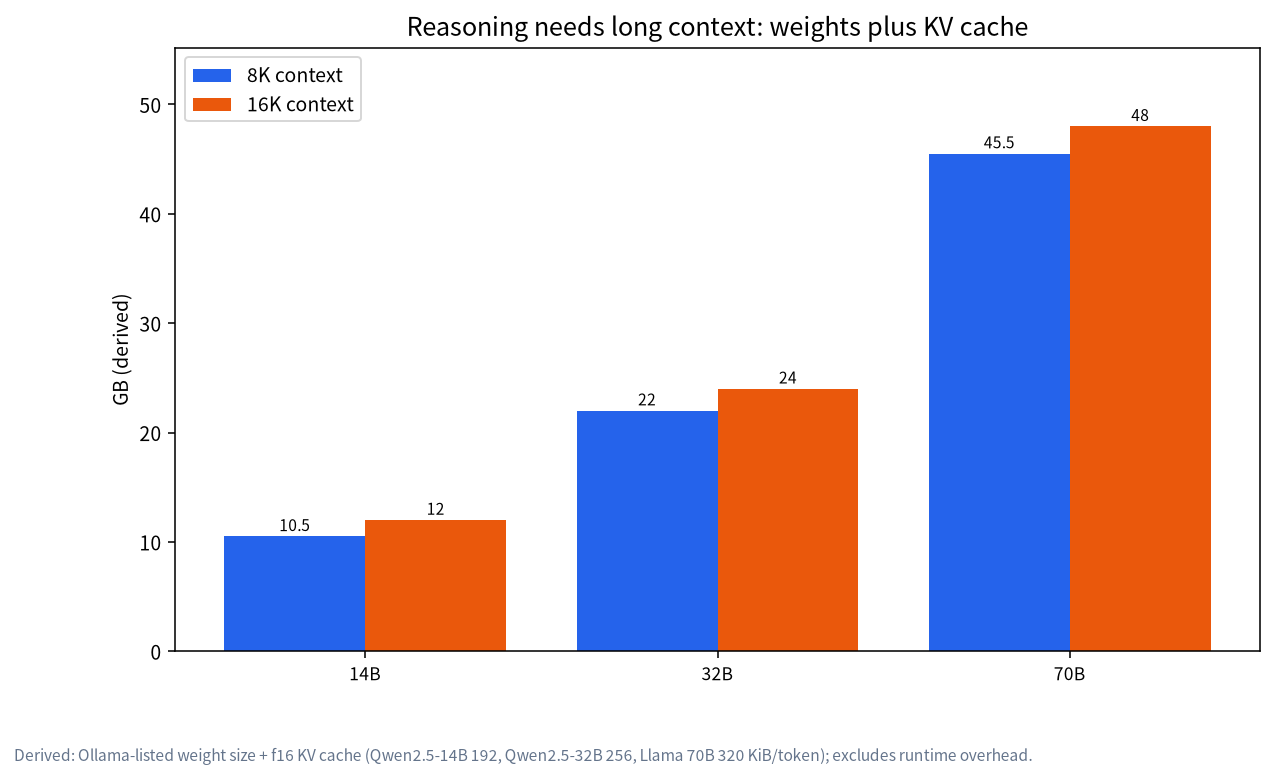
Read this as a warning, not a promise. The 32B distill fits a 24GB card only with a short context, and a long hard problem can exceed it, at which point it either errors, shrinks the context or spills to system memory and slows sharply. If your card is 24GB, see our 24GB VRAM guide for how to fit the context.
Which Size for Which VRAM
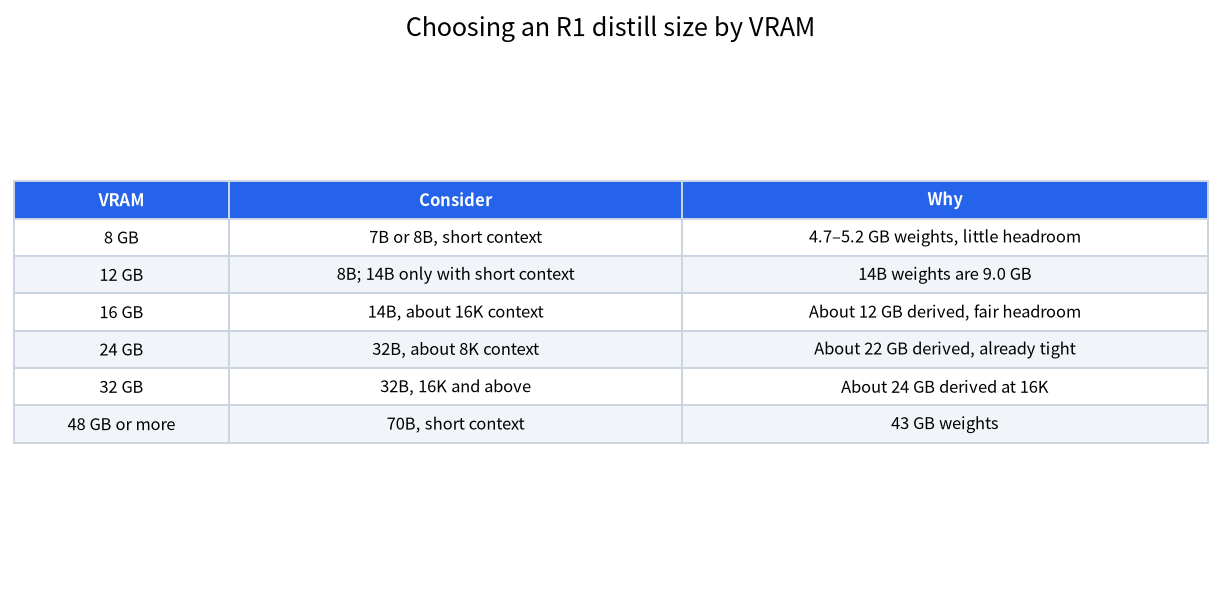
For 8GB cards, the 7B and 8B distills are the realistic options, with a short context, and our 8GB VRAM guide has the details. At 12GB, the 8B runs comfortably and the 14B (9.0GB) fits only with a short context. At 16GB, the 14B is the sweet spot, with about 12GB used at 16K context by our derivation, and our 12GB and 16GB guide covers cards in that range. At 24GB, the 32B is possible with around 8K of context. At 32GB, the 32B has room for 16K and beyond. For the 70B you need about 48GB or more, which can mean two cards, as in our dual GPU guide, or a large unified-memory machine.
If you cannot decide, our model size chooser walks through the choice from your tasks, and our VRAM guide explains the estimate behind the tables.
Thinking Time: A Speed Ceiling You Can Compute
Because the model writes a long thinking section before it answers, speed matters more than with a chat model: you wait for the thinking, not just the answer. A rough ceiling comes from memory bandwidth divided by the bytes read per generated token, which is about the weight size for a dense model. These are derived ceilings, not measured speeds, and real results are lower. A 14B distill (9.0GB) on an RTX 5060 Ti with 448 GB/s of bandwidth gives a ceiling of about 50 tokens per second. A 32B distill (20GB) on an RTX 3090 with 936 GB/s gives about 47, and on an RTX 4090 with 1,008 GB/s about 50. If the model thinks for 2,000 tokens before answering, that is roughly 40 seconds at the ceiling, and longer in practice.
This is why a smaller distill is sometimes the better choice even when a larger one fits. If you ask many quick questions, a 14B that thinks fast may serve you better than a 32B that makes you wait. For hard problems where accuracy matters more than speed, the larger one may be worth the wait. We cannot tell you which is better for your tasks without testing, and we do not quote scores.
How to Test a Size Before You Commit
Do not choose from a table alone. Pick three questions from your real work: one easy, one medium and one that you know is hard. Run each on the smaller size first and then on the next size up, with the same settings. Note the time to the final answer, whether the answer was correct, and the memory use shown by ollama ps while the model is running. If the smaller size answers all three, stop there. If it fails only the hard one, decide whether that task is common enough to justify the extra memory and waiting. Keep the results in a short note so that you can repeat the test when a new model appears.
Watch for two signals of a size that is too big for your hardware. The first is the Processor column in ollama ps showing a split between CPU and GPU, which means part of the model spilled to system memory. The second is a sudden drop in speed late in a long answer, which usually means the context grew past what fits. Both are fixed by a smaller size, a shorter context or a lower-precision cache, as described in our quantisation guide.
When Not to Use a Reasoning Model
Reasoning distills are not the best tool for everything. For casual chat, short rewrites, translation or simple lookups, a regular instruction-tuned model of similar size usually answers faster, without the long thinking section. Reserve the R1 distills for maths, logic puzzles, planning and code that benefits from step-by-step work, and keep a regular model available for the rest. Many people run both through the same interface and switch per task, which also keeps the context budget for the tasks that need it.
Settings That Matter for Reasoning Models
The model card gives usage recommendations that apply to the whole R1 family. Set the temperature between 0.5 and 0.7, with 0.6 recommended, to prevent endless repetition or incoherent output. Avoid a system prompt and put all instructions in the user prompt. For maths problems, the card suggests asking for step-by-step reasoning with the final answer in a box. It also notes that the models sometimes skip thinking, and recommends forcing the response to start with a think tag if you need thorough reasoning. Frontends and Ollama may handle these details differently, so check how yours treats the thinking section; some hide it, and some count it against the context.
Quantisation and the Smaller Sizes
All the Ollama sizes above are quantised files, roughly Q4_K_M, so the download sizes already include the compression. Going lower than that, to 3-bit or 2-bit files, saves memory but costs quality, and reasoning models are sensitive because a small error early in the thinking can derail the rest. If a size does not fit, it is usually wiser to move one size down at the standard quantisation than to squeeze the bigger one into a harsher file.
Licences and Commercial Use
The model card says the weights and repository are under the MIT licence and that the series supports commercial use and distillation. It adds that the Qwen-based distills derive from Qwen2.5, originally under Apache 2.0, and that the Llama-based ones derive from Llama 3.1 and Llama 3.3 and carry those licences. If you plan commercial use, read the licence of the specific base model, since terms differ.
Common Mistakes
- Calling every R1 variant “DeepSeek R1”. The distills are different models from the 671B original.
- Pulling
deepseek-r1and assuming it is the Llama 8B. The default tag is now the 0528 Qwen3-based 8B. - Sizing by weights alone. Long reasoning needs far more KV cache than a chat.
- Using a system prompt and low temperature. The card recommends neither.
- Expecting a 32B to run well on 24GB at long context. It is tight even at 16K.
- Ignoring the base licence. Check the licence of the base model.
FAQ: DeepSeek R1 Distill Sizes
Which DeepSeek R1 distill should I run on 16GB of VRAM?
The 14B, at about 9.0GB for the weights, leaves room for a context around 16K by our estimate, which totals about 12GB.
Is the 7B or 8B better for an 8GB card?
Both fit with a short context. The 8B tag is a newer Qwen3-based model on Ollama, so try it first, and compare on your own tasks.
Can I run the full 671B DeepSeek R1 at home?
The Ollama download is 404GB, which needs server-class memory, so it is not a consumer-GPU option.
Why does my reasoning model run out of memory on long questions?
The thinking text stays in the KV cache, so memory grows with its length. Use a shorter context or a smaller size.
Are the distills as good as the full model?
We do not quote benchmark comparisons. They are smaller models fine-tuned on reasoning data, so test them on your own tasks.
Do I need a system prompt?
The model card recommends avoiding one and putting instructions in the user prompt.
Talk With Us
Not sure which size fits your card? Ask in the community or email admin@microaione.com.
References: DeepSeek-R1-Distill-Qwen-32B model card, DeepSeek-R1 paper, Ollama deepseek-r1 library, Ollama deepseek-r1 tags.