LLM on Raspberry Pi and Jetson: What a Small Board Can Really Run in 2026
A Raspberry Pi costs less than a graphics card, sips power and fits in a drawer, so it is natural to ask whether you can run an LLM on Raspberry Pi and stop worrying about hardware. The honest answer is yes, but only small models and only at modest speed. This guide explains why, using memory bandwidth and file sizes rather than guesses, compares the Raspberry Pi 5 with NVIDIA’s Jetson Orin Nano Super, and shows when a small board is the right tool and when a used GPU or a mini PC would serve you better. If you are new to the topic, start with our local LLM deployment guide.
Verification note: Raspberry Pi 5 specifications and list prices come from the Raspberry Pi product brief; Jetson Orin Nano Super specifications and price come from NVIDIA’s product page and technical blog; model file sizes come from the Ollama library; the bandwidth rule comes from how token generation reads the model once per token. All were checked on 2026-10-30. Speed figures in this article are theoretical ceilings that we derived, not measurements. We did not benchmark any board for this article.
Key takeaways (Updated 2026-10-30)
- A Pi 5 can run 1.5B to 3B quantized models for learning and light tasks; a 7B model fits in 8GB but generation is slow because memory bandwidth is only in the high teens of GB/s.
The Jetson Orin Nano Super has 8GB at 102 GB/s and 67 TOPS for $249, which makes it the better small board for generation, but 8GB still limits you to roughly 7B to 8B at 4-bit.
For a general assistant, a used 12GB GPU or a large-memory mini PC gives more speed and room per yuan than either board.
What You Can Expect From an LLM on Raspberry Pi
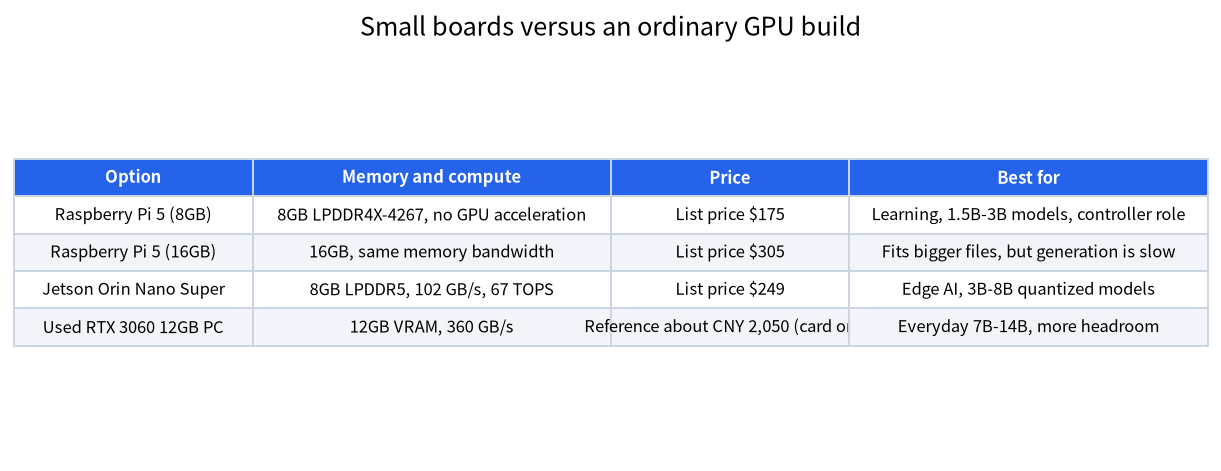
The Raspberry Pi 5 uses a Broadcom BCM2712 with four Arm Cortex-A76 cores at 2.4GHz and LPDDR4X-4267 memory in 1GB, 2GB, 4GB, 8GB and 16GB versions, with list prices of $45, $77.50, $110, $175 and $305 in the product brief. It has no GPU that popular LLM runtimes use for acceleration, so inference runs on the four CPU cores. That is workable for small models. A 1.5B-parameter model in a 4-bit format is about 1.1GB in the Ollama library (the deepseek-r1:1.5b tag), and a 7B model is about 4.7GB. Both fit in 8GB of RAM, which is why people report that they “run”.
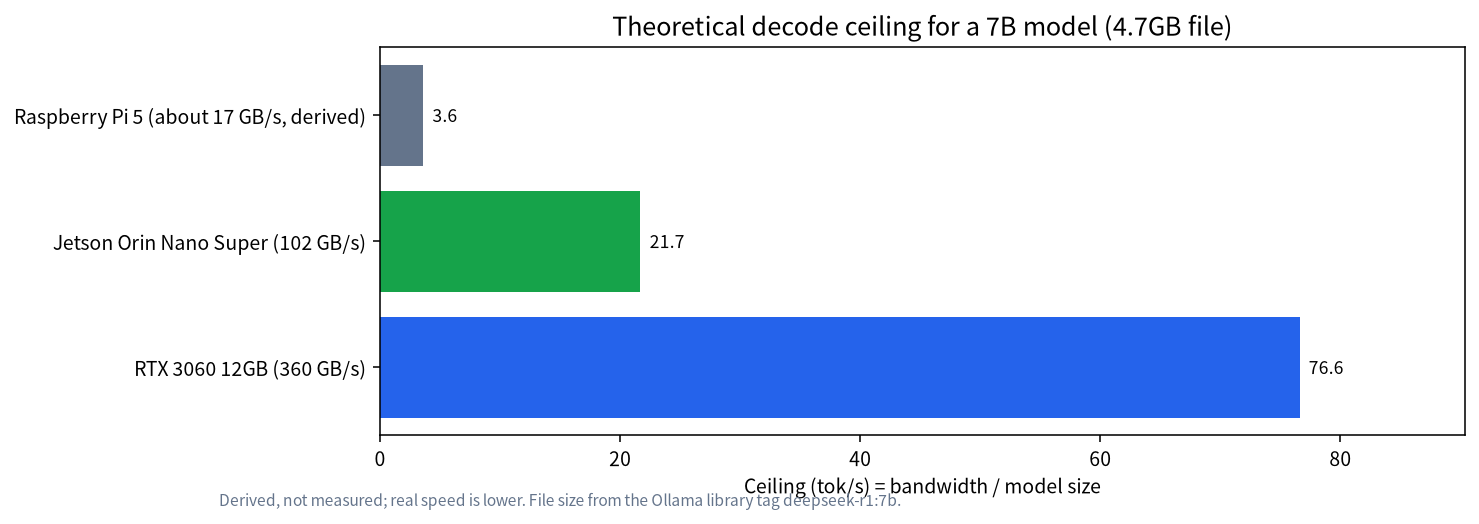
Running and running well are different things. Text generation is limited mostly by how fast the processor can read the whole model from memory for every token. If we assume the Pi 5 has a single 32-bit LPDDR4X-4267 channel, its peak bandwidth is about 4,267 million transfers per second times 4 bytes, roughly 17 GB/s. This is our derivation from the published memory type, and the 32-bit width is an assumption, so treat the number as an order of magnitude. Dividing 17 GB/s by a 4.7GB model gives a ceiling near 3.6 tokens per second, and real systems land below the ceiling. For a 1.1GB model the ceiling is around 15 tokens per second. That explains the common experience: a tiny model feels usable, a 7B model feels like waiting for a slow typist.
Raspberry Pi 5 Versus Jetson Orin Nano Super
NVIDIA’s Jetson Orin Nano Super Developer Kit is the obvious step up in the small-board category. NVIDIA lists it at $249 with an 8GB 128-bit LPDDR5 memory system at 102 GB/s, a 1,024-core Ampere GPU with 32 tensor cores, a six-core Arm Cortex-A78AE CPU, 67 TOPS of AI performance (sparse INT8) and a 7W to 25W power range. NVIDIA’s technical blog says the “Super” boost raised memory bandwidth from 68 to 102 GB/s through a software power mode, and that older kits can receive it with a JetPack update.
The difference that matters for language models is bandwidth plus a real GPU. At 102 GB/s the same 4.7GB model has a ceiling near 22 tokens per second, about six times the Pi’s ceiling, and the GPU handles the prompt-processing stage much better than four CPU cores. The price is a different software stack. Jetson boards run NVIDIA’s JetPack Linux with CUDA for Arm, and some desktop tools need extra steps or special builds. For a hobbyist who just wants a chat box, that is more friction than installing Ollama on a PC, so read the Ollama install guide first and check that your runtime supports Jetson before you buy.
| Item | Raspberry Pi 5 (8GB) | Jetson Orin Nano Super | Used 12GB GPU PC |
|---|---|---|---|
| Memory used by the model | 8GB shared RAM | 8GB shared RAM | 12GB VRAM plus system RAM |
| Memory bandwidth | about 17 GB/s (derived) | 102 GB/s | 360 GB/s (RTX 3060 12GB) |
| Ceiling, 4.7GB model | about 3.6 tok/s | about 22 tok/s | about 77 tok/s |
| Power range | 5V/5A supply | 7W to 25W module | desktop class, 170W-class card |
| Price signal | $175 list | $249 list | about CNY 2,050 card (reference) |
| Software effort | Low (ARM Linux) | Medium (JetPack) | Low (Windows or Linux) |
Reference prices for the PC column come from our price reference table (a median of listings checked on 2026-10-30) and are for orientation only. The ceilings are derived from bandwidth divided by file size and are not benchmark results.
Which Models Fit
Use file size, not the parameter count alone. The llama.cpp quantization notes list Llama 3.1 8B at about 4.9GB in Q4_K_M, which is roughly 0.61GB per billion parameters. On an 8GB board you need to leave room for the operating system, the context cache and the runtime, so a practical limit is a file of about 5GB or less. That means 1B to 3B models are comfortable, 7B to 8B models fit but leave little room for long contexts, and anything around 14B at 4-bit (about 9GB) does not fit at all. A 16GB Pi 5 fits a 14B model, but at 17 GB/s its ceiling is only about two tokens per second, which is rarely a pleasant experience.
Context length also costs memory. As explained in our context length and KV cache guide, a 7B-class model needs tens of kilobytes per token for its cache, so a long conversation can eat a gigabyte or more. On a small board, keep the context at 2K to 4K tokens, and prefer models designed to be small. Newer small models are often better per parameter than older, larger ones, which is the best reason to test a recent 1B to 4B model before you buy anything bigger.
| Model class | 4-bit file size (approx.) | Fits in 8GB board? | What to expect |
|---|---|---|---|
| 1.5B | about 1.1GB | Yes, with room for context | Short answers, simple extraction |
| 3B to 4B | about 2GB to 2.5GB | Yes | Casual chat, summaries of short text |
| 7B to 8B | about 4.7GB to 5.2GB | Barely; keep context short | Better answers, slow on a Pi |
| 14B | about 9GB | No (needs 16GB board) | Very slow on a Pi |
| 32B | about 20GB | No | Not a small-board job |
File sizes for the 1.5B, 7B, 8B, 14B and 32B rows follow the Ollama library listing for deepseek-r1 tags (1.1GB, 4.7GB, 5.2GB, 9.0GB and 20GB); the 3B to 4B row is our estimate from the 0.61GB-per-billion rule.
Read the table as a budget rather than a promise. The operating system, the runtime and the context cache all take memory on the same chip, so a model that is exactly the size of your RAM will not load. A useful habit is to subtract about 2GB for the system and the cache from the board’s memory and choose a file that fits inside what is left, then test with your real prompts before you build anything on top of it.
Jobs Where a Small Board Makes Sense
Small boards shine when you need low power, always-on operation, or a physical project rather than a general chat assistant. Here are the jobs where they earn their place:
- Learning and teaching. A Pi lets students see tokenization, quantization and memory limits on real hardware for very little money.
- Offline utilities. Classifying text, extracting fields from short messages, or running a voice-assistant intent parser with a 1B to 3B model.
- Controller for a bigger machine. The Pi can host a web interface or a scheduler that calls a stronger model on another computer on your network.
- Edge vision and robotics. The Jetson, with its GPU and camera interfaces, is built for models that read sensors; language models are a bonus.
- A kiosk that must stay private. If the data cannot leave the room, even a slow local model can be acceptable for short answers.
For a phone-sized, battery-powered option, see our on-device guide.
Setting Up a Small Model on a Pi
The steps are short. Use a 64-bit operating system, update it, and add active cooling because sustained inference keeps all cores busy. Put the model files on an NVMe drive through the M.2 adapter or a good USB 3 drive instead of a slow microSD card, since loading a multi-gigabyte file from a card is painful. Install a runtime that supports Arm: Ollama and llama.cpp both publish builds for Linux on Arm64, and llama.cpp can be compiled from source with the default CPU backend. Pull a small quantized model, for example a 1.5B or 3B instruct model, set the context to 2,048 tokens and ask a short question. Measure the speed with the runtime’s own timing output, and write your number down; our derived ceiling is only an upper bound.
Two settings help. Keep the number of threads equal to the number of physical cores (four), because more threads add contention on a memory-bound workload. And close the desktop environment if you can, since the operating system’s graphical session uses memory you would rather give to the model. Learn how the files themselves work in the GGUF and llama.cpp introduction.
Is It Cheaper Than a PC?
Not for the same experience. A 16GB Pi 5 lists at $305 before the power supply, cooler, case and drive, and an 8GB Jetson kit is $249 before accessories. In our reference table a used RTX 3060 12GB card is around CNY 2,050 and a new one around CNY 3,475, and it has more than twenty times the Pi’s bandwidth. The board’s advantage is power draw and size, not price per token. If you only need the machine a few hours a week, a PC you already own with a cheap GPU upgrade is often the better route. If you want an always-on unit, compare the board with a large-memory mini PC, which gives more memory and bandwidth in a still small box.
Common Mistakes
- Buying the 16GB version for speed. More memory lets you load a bigger model, not run it faster; bandwidth is unchanged.
- Using a microSD card for models. Slow loading and wear; use NVMe or a fast external drive.
- Skipping cooling. Inference is a sustained load and the CPU will throttle without a fan.
- Expecting a 7B model to feel interactive. Plan on a few tokens per second at best.
- Ignoring software support on Jetson. Check that your tools have Jetson builds before you commit.
FAQ: LLM on Raspberry Pi and Jetson
Can a Raspberry Pi 5 run a 7B model?
Yes if you have 8GB or more of RAM and a 4-bit file of about 4.7GB, but expect only a few tokens per second because memory bandwidth is the limit.
What size model should I use on a Pi 5?
Start with a 1B to 3B quantized model. They fit easily, leave room for context and respond at a usable speed.
Is the Jetson Orin Nano Super better than a Pi for LLMs?
For generation, yes: it has 102 GB/s of bandwidth, a GPU and 67 TOPS, against a Pi that has no GPU acceleration for these runtimes. It costs more and needs NVIDIA’s software stack.
Does the 16GB Raspberry Pi 5 run models faster?
No. It loads larger models, but the memory bandwidth is the same, so speed per token stays roughly the same for a given model.
Do I need a fan or heatsink?
Yes. Sustained inference keeps all four cores busy, and active cooling avoids thermal throttling.
Is a small board good enough for a private assistant?
For short, simple tasks with a small model, yes. For long documents, coding help or detailed reasoning, a used GPU or a larger mini PC is much more comfortable.
Talk With Us
Planning a small-board project or comparing it with a PC build? Join the community or email admin@microaione.com.
References: Raspberry Pi 5 product brief, NVIDIA Jetson Orin Nano Super Developer Kit, NVIDIA technical blog on the Super boost, Ollama library: deepseek-r1.