Qwen Local Deployment Hardware Requirements: VRAM, RAM and KV Cache by Model, From 4B to 122B
“Qwen local deployment hardware requirements” is among the questions we get most, yet the generic answer “24GB of VRAM is enough” is often wrong: Qwen’s 4B needs about 3GB, the 122B needs over 80GB, and the 397B needs over two hundred. Worse, weights are only part of the VRAM bill; the KV cache for long context can take several GB to tens of GB more. This article uses the structural parameters on the official model cards to work out, step by step, each model’s weight size, KV cache and speed ceiling, and then gives tiered hardware advice. All the arithmetic is shown so you can swap in your own model and context. We have not benchmarked every model, so sizes come from Ollama pages and data this site read earlier, and speed is given only as theoretical bandwidth ceilings.
Key points (updated 2026-11-04)
- Q4_K_M weight size is about 0.61 GB per billion parameters: 4B about 2.4GB, 27B about 17–20GB, 35B-A3B about 22–23GB, 122B about 81GB, 397B over 240GB.
Models since Qwen3.5 use many linear-attention (GDN) layers, so the KV cache is much smaller than in classic architectures: Qwen3.6 27B uses about 64KiB per token, or about 16GiB at 262K context; 35B-A3B uses only about 20KiB per token.
Usable VRAM on a 24GB card is about 23.4GB: 27B Q4 with 32K context is about 21GB and fits; the 35B-A3B weights alone are near the limit, so some experts must live in system RAM.
- Speed ceiling ≈ memory bandwidth ÷ bytes of weights read per token. A 27B dense model on a 4090 tops out near 54 tokens/s in theory, and real speed is lower; MoE models read only active parameters, so their ceiling is far higher.
Conclusion first: Qwen local deployment hardware requirements by tier
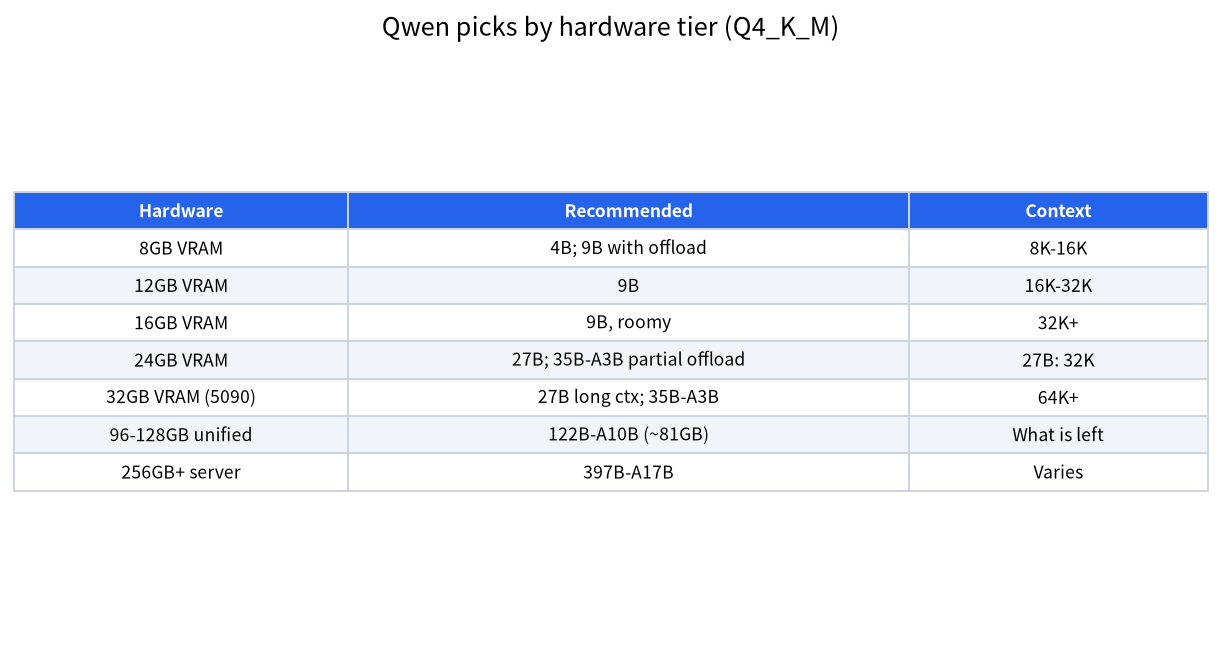
| Usable VRAM or memory | Recommended model (Q4_K_M) | Suggested context | Notes |
|---|---|---|---|
| 8GB VRAM | 4B; 9B with trimmed context and some RAM offload | 8K to 16K | 9B weights are about 6.6GB, tight with cache |
| 12GB VRAM | 9B, comfortable | 16K to 32K | See the 12GB and 16GB VRAM guide |
| 16GB VRAM | 9B with headroom; 27B does not fit | 32K and up | 27B weights of 17–20GB do not fit |
| 24GB VRAM | 27B; 35B-A3B with partial offload to RAM | 27B: 32K; longer needs a quantized cache | See what a 24GB card can run |
| 32GB VRAM (5090) | 27B at long context; 35B-A3B fully in VRAM | 64K and up | 22–23GB of weights plus cache |
| 96GB or 128GB unified memory | 122B-A10B (about 81GB) | Whatever space remains | Speed depends on memory bandwidth |
| Server with 256GB+ RAM | 397B-A17B | Varies | Not a home scenario |
The rest of the article explains where this table comes from.
Step 1: how to compute weight size
Quantized weight size ≈ parameters × bytes per parameter. Q4_K_M averages about 0.61 GB per billion parameters (we derived this in the Q4_K_M explainer), Q8_0 is about 1.0625 bytes per parameter, and BF16 is 2 bytes.
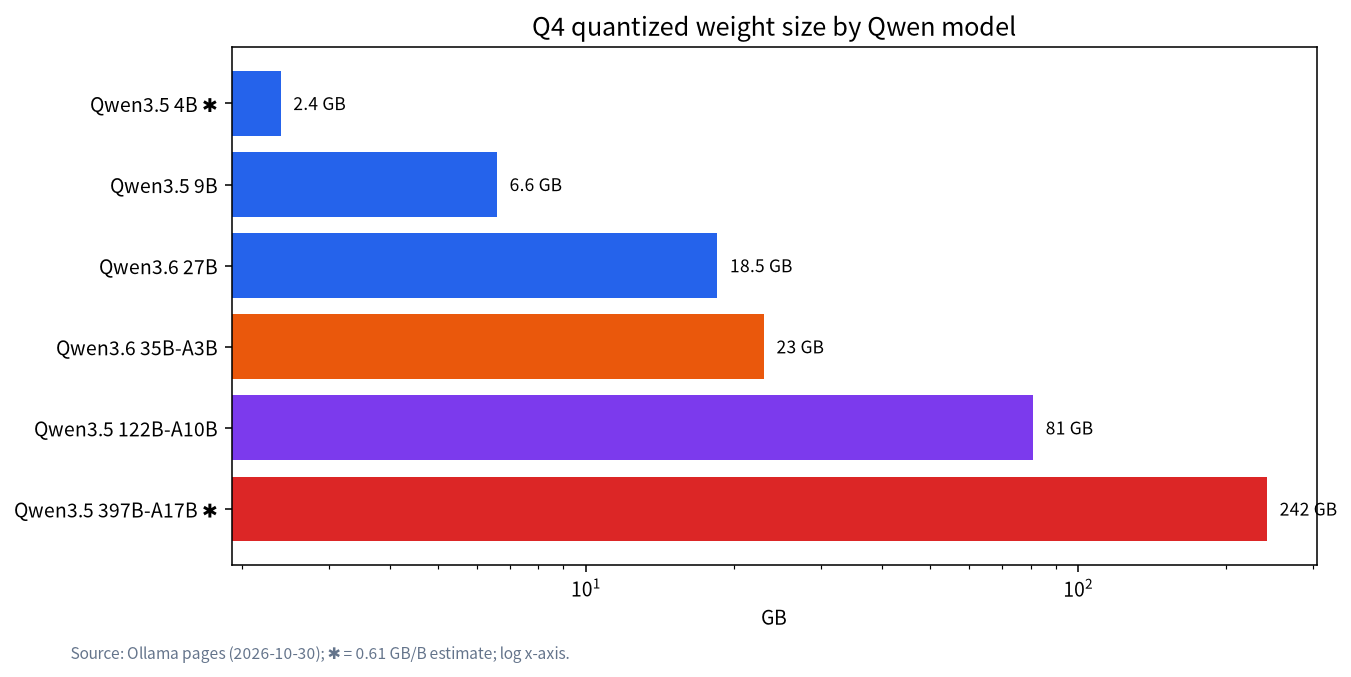
| Model | Parameters | Q4 weight size | Source |
|---|---|---|---|
| Qwen3.5 4B | 4B | about 2.4GB ✱ | 0.61 × 4 estimate |
| Qwen3.5 9B | 9B | about 6.6GB | Ollama page |
| Qwen3.6 / 3.8 27B | 27B | 17 to 20GB | Ollama pages, varies by release |
| Qwen3.6 35B-A3B | 35B (about 3B active) | 22 to 23GB | Ollama pages |
| Qwen3.5 122B-A10B | 122B (about 10B active) | about 81GB | Ollama page |
| Qwen3.5 397B-A17B | 397B (about 17B active) | about 242GB ✱ | 0.61 × 397 estimate |
| Qwen3.8 2.4T-A95B | 2.4T (about 95B active) | about 1,464GB ✱ | 0.61 × 2,400 estimate |
The last row is blunt: 2.4T is not a local model; it needs a multi-node cluster, and 397B is already server territory. The official GitHub lists these releases with dates and parameters, so rely on the QwenLM repositories. Note that size is the download size; real VRAM also needs cache and runtime overhead. Our habit is to reserve about 0.6GB for system use: an 8GB card gives about 7.4GB, 12GB about 11.4GB, 24GB about 23.4GB.
Step 2: how to compute the KV cache
The KV cache is the VRAM a model uses to “remember” context. For classic attention it is computed from layer count, KV heads, head dimension and bytes per value:
KV bytes per token = full-attention layers × 2 (K and V) × KV heads × head dimension × bytes per value.
Models since Qwen3.5 mix linear attention (Gated DeltaNet, GDN) with a few full-attention layers, and the linear layers keep a fixed-size state that does not grow with context. So only the full-attention layers need counting. The official model-card parameters we read:
| Model | Total layers | Full-attention layers | KV heads | Head dim | KV per token (FP16) |
|---|---|---|---|---|---|
| Qwen3.6 27B | 64 (16 groups of 3 GDN plus 1 full attention) | 16 | 4 | 256 | 64KiB |
| Qwen3.6 35B-A3B | 40 | 10 | 2 | 256 | 20KiB |
| Qwen3.8 2.4T-A95B | 92 | 23 | 4 | 256 | 92KiB |
Worked example (27B): 16 × 2 × 4 × 256 × 2 bytes = 65,536 bytes = 64KiB per token. At 32K context (32,768 tokens): 64KiB × 32,768 = 2GiB; at 128K, 8GiB; at 262K, 16GiB. For 35B-A3B the same arithmetic is 10 × 2 × 2 × 256 × 2 = 20,480 bytes, or 20KiB; at 262K that is about 5GiB.
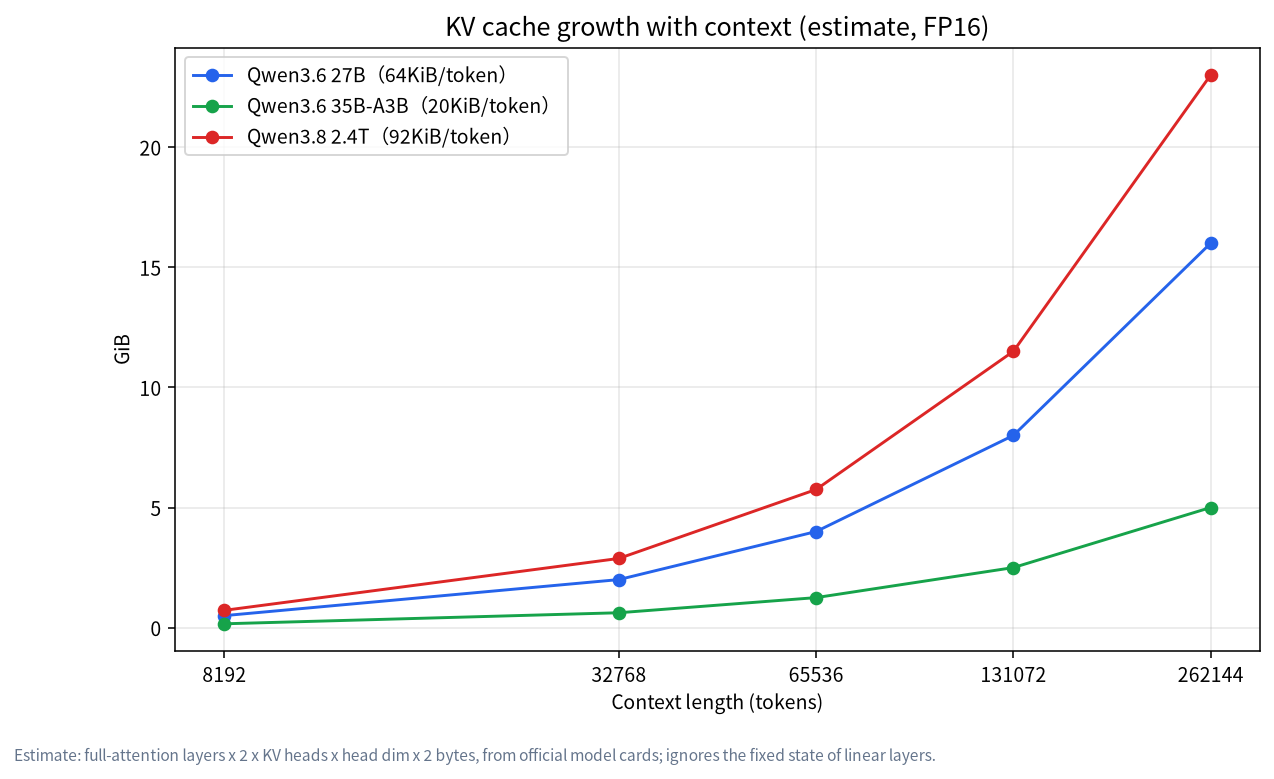
These are estimates: they ignore the fixed linear-attention state, activations and runtime buffers, so real usage runs somewhat higher. Cache quantization in runtimes such as llama.cpp (for example q8_0) roughly halves the KV cache at a small quality cost. The general principle is in context length and KV cache.
Step 3: add weights and cache together
Take a 24GB card (about 23.4GB usable) and reserve about 1GB for runtime overhead:
| Scenario | Weights | KV cache | Runtime reserve | Total | Fits in 24GB? |
|---|---|---|---|---|---|
| 27B Q4, 32K context | about 18.5GB | 2GiB | about 1GB | about 21.5GB | Yes |
| 27B Q4, 128K, FP16 cache | about 18.5GB | 8GiB | about 1GB | about 27.5GB | No |
| 27B Q4, 128K, q8_0 cache | about 18.5GB | about 4.25GiB | about 1GB | about 23.8GB | At the limit, unstable |
| 35B-A3B Q4, 32K context | about 23GB | about 0.62GiB | about 1GB | about 24.6GB | No; offload some experts |
Look at row four. Although 35B-A3B activates only about 3B parameters per token, all the experts’ weights still have to live somewhere. Putting some experts in system RAM is the standard way to run MoE models on a 24GB card; the mechanics and trade-offs are in local MoE deployment and RAM versus VRAM.
Step 4: how to estimate the speed ceiling
Generating each token reads the active weights from memory once, so the theoretical ceiling is:
ceiling (tokens/s) ≈ memory bandwidth ÷ bytes of weights read per token.
An RTX 4090 has 1008 GB/s of memory bandwidth. A 27B dense model at Q4 is about 18.5GB and every token reads all of it: 1008 ÷ 18.5 ≈ 54 tokens/s, and real speed will be below that (typically a fraction of the ceiling; we did not measure it). 35B-A3B reads only about 3B active parameters per token, about 0.61 × 3 ≈ 1.8GB at Q4; fully in VRAM the ceiling is 1008 ÷ 1.8 ≈ 550 tokens/s. If the active experts sit in system RAM, DDR5-5600 dual-channel has a theoretical bandwidth of about 89.6GB/s (5600 × 8 bytes × 2), and the ceiling falls to about 89.6 ÷ 1.8 ≈ 50 tokens/s.
The gap shows that for MoE models, where the experts live matters more than total parameters. The 122B-A10B at Q4 is about 81GB; on a 128GB unified-memory machine with, say, 250GB/s of bandwidth, each token reads about 6GB (0.61 × 10), so the ceiling is about 40 tokens/s. That too is only a theoretical value.
GPU picks by budget
| Budget (reference price) | GPU | Fits | Note |
|---|---|---|---|
| about ¥3,500 | RTX 3060 12GB (new) | 4B, 9B | Entry |
| about ¥5,600 | RTX 5060 Ti 16GB | 9B with headroom | See the 5060 Ti 16GB review |
| about ¥7,550 | Used RTX 3090 24GB | 27B | Used-card risks are in the related guide |
| about ¥26,465 | RTX 4090 24GB | 27B, faster | Same 24GB capacity |
| about ¥53,500 | RTX 5090 32GB | 27B long context, 35B-A3B | Plan a 1000W PSU |
| Tens of thousands of yuan | 96GB workstation card or 128GB unified-memory system | 122B-A10B | See the RTX PRO 6000 workstation |
Prices are our 2026-10-30 references; verify before buying. With the same 24GB, a used 3090 and a 4090 differ mainly in speed and price: capacity decides whether it runs, bandwidth decides how fast.
Four common misconceptions
Misconception 1: parameter count equals VRAM use. The “A3B” in 35B-A3B means about 3B parameters are active per token, which affects speed, not capacity; every expert’s weights still have to fit somewhere.
Misconception 2: if the weights fit, you are fine. Cache and runtime overhead also take VRAM. 22GB of weights in a 24GB card looks feasible, but add context and it spills into RAM and speed collapses.
Misconception 3: bandwidth does not matter. At 24GB each, a used 3090 has 936 GB/s and a 4090 has 1008 GB/s, not far apart; but if DDR5 (about 90GB/s) stands in for VRAM, speed drops by roughly an order of magnitude.
Misconception 4: a bigger quant is always better. For 27B, Q8_0 needs about 29GB (27 × 1.0625), already over 24GB; Q4_K_M with longer context is usually more useful than Q8 with a tiny context.
A complete worked example: building a machine for 27B
Goal: run Qwen3.6 27B locally at 64K context for a single user.
- Weights: about 18.5GB at Q4.
- KV cache: 64KiB × 65,536 tokens = 4GiB (FP16); about 2.1GiB with a q8_0 cache.
- Runtime reserve: about 1GB.
- Total: about 23.5GB with an FP16 cache (a hair over the 23.4GB usable on a 24GB card, unstable); about 21.6GB with q8_0, feasible.
- Speed ceiling: about 54 tokens/s on a 4090 and 936 ÷ 18.5 ≈ 51 on a 3090, little difference, so the used 3090 is better value.
- Build: a used-3090 system is about ¥14,299 in our reference and a 4090 system about ¥33,214; the gap buys faster prompt processing and better efficiency.
The lesson: choose a card by capacity first, then bandwidth, and only last by brand generation.
Verify it yourself
Do not trust the arithmetic blindly. After starting, check real VRAM use with nvidia-smi and compare it with our estimate; vary the context length and see whether the growth slope is near 64KiB per token. If the real number is clearly higher, the runtime is allocating extra cache space or using a larger batch, and you can reduce the relevant settings according to its documentation.
Do the same for speed: use one prompt and one context length, record generation tokens/s, and compare with the bandwidth ceiling above. If you reach roughly sixty to eighty percent of it, the setup is sound; if you see only twenty or thirty percent, some layers or experts have probably fallen into RAM, or threads, batch size or driver settings are wrong. Check those before buying a new card. Send your measured numbers and command to the community and we can compare them with you.
Memory, disk and everything else
- System RAM: if everything is in VRAM, 16GB is enough; if you offload experts or layers, start at 64GB, and the 122B needs 128GB.
- Disk: model files range from 5GB to 80GB; use NVMe and leave room for several versions.
- Power supply: 850W for a 4090 system and 1000W for a 5090 system, as in our reference price list.
- OS: Windows works through WSL2 or native runtimes; see Windows, WSL2 and Docker.
FAQ
What are Tongyi Qianwen / Qwen local hardware requirements?
Tongyi Qianwen local hardware requirements (Qwen local deployment requirements) scale with parameter count and quantization; larger variants need more VRAM, and MoE models also depend on active parameters. Pick the model first, then the GPU—examples are above.
What is the minimum hardware for Qwen local deployment?
The smallest models (0.8B, 2B, 4B) run even on an 8GB-RAM computer without a discrete GPU. For useful quality start at 9B, which wants about 8GB to 12GB of VRAM.
How much VRAM does Qwen3.6 27B need?
Q4 weights are about 18 to 19GB, a 32K-context KV cache is about 2GiB and runtime overhead about 1GB, about 21.5GB in total, so a 24GB card can run it.
Can a 24GB card run Qwen3.6 35B-A3B?
The weights are about 22 to 23GB, nearly the whole card, so some experts need to sit in system RAM to be stable. Because only about 3B parameters are active per token, speed is usually still usable but depends on memory bandwidth.
Why does Qwen’s long context use so little VRAM?
Newer models use full attention in only about a quarter of their layers; the rest use linear attention with a fixed-size state. We calculate about 16GiB of KV cache for the 27B at 262K context, far less than a classic architecture of the same size would need.
Can Qwen3.8 2.4T run locally?
Not realistically. At Q4 it is about 1.46TB and needs a multi-node cluster, beyond home hardware.
Can a Mac run Qwen?
Yes. Large unified memory makes Macs suitable for 27B to 122B-class models; speed depends on memory bandwidth. See our Mac local LLM guide.
Talk to us
If you want us to run the numbers for your GPU, RAM and context needs, leave your configuration and target model in the community or email admin@microaione.com. For the full deployment steps see the Qwen local deployment guide; if you wonder whether local Qwen needs a “jailbreak”, read does Qwen need jailbreaking for local deployment.
References: QwenLM on GitHub, Ollama Qwen3 page, llama.cpp. Model parameters read on 2026-11-04, sizes read on 2026-10-30, Beijing time.