Small Team Shared Local LLM: Sizing, Access Control and Cost for 3 to 10 People
One person on one GPU is easy. The questions change when a team of three to ten people wants to share a model: how much memory does each extra user need, how do you stop strangers from using the server, what happens when two people ask at once, and what does it all cost? This guide to a small team shared local LLM works through those questions with arithmetic you can check, using our reference prices and the documented behaviour of Ollama and Open WebUI. It is not a case study. We have no customer deployments to report, and we do not invent any.
Verification note: Concurrency behaviour comes from the Ollama FAQ, and the role-based access feature from the Open WebUI project page, both read on 2026-10-30. Memory figures are derived from model sizes and KV cache sizes in our earlier guides and are estimates; real use adds runtime overhead. Prices are reference prices from 2026-10-30. We did not load-test a team server for this article, so we give no speed figures, and nothing here is legal advice.
Key takeaways (Updated 2026-10-30)
- Each parallel user needs its own context memory: Ollama’s documentation says parallel requests increase the context size by the number of parallel requests, so four users at 8K context cost about four times one user’s KV cache.
By our derived estimate, four users at 8K on a 14B Q4_K_M model need about 14.6GB, so a 24GB card is comfortable, while a 32B model with four users needs about 27.7GB and points to a 32GB card or more.
Put accounts and roles in front of the model (Open WebUI offers role-based access control and user groups), keep the inference port off the network, and plan an exit to dedicated serving software or the cloud if the team outgrows the box.
What a Shared Server Has to Do
A shared server has four jobs. It must hold the model in memory, serve several requests without one person blocking the rest for minutes, know who is using it, and keep data from leaking to people who should not see it. A single-user setup does only the first.
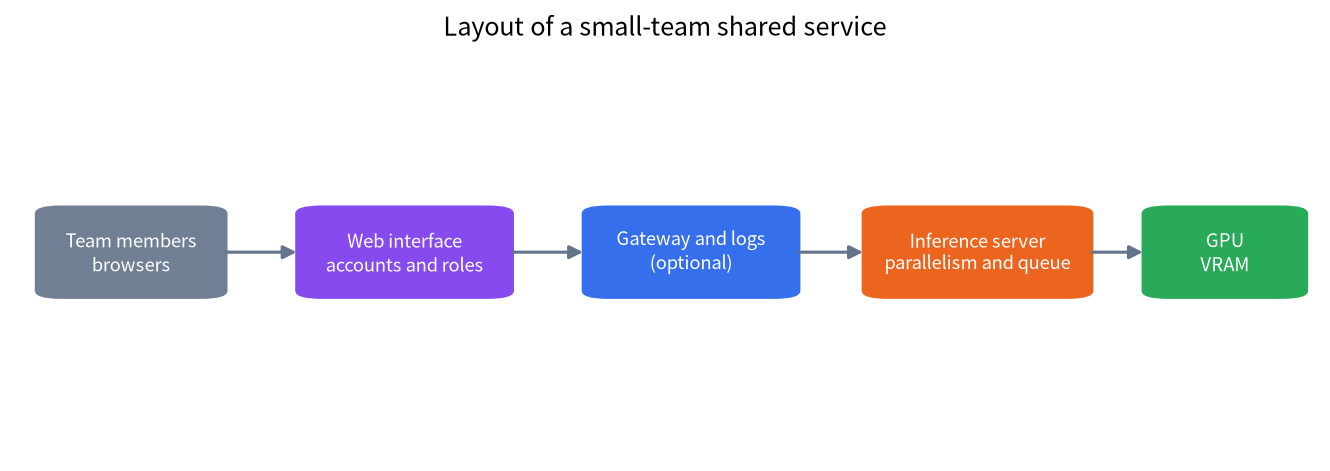
Most small teams do not need a cluster. They need one reasonably strong machine, a web interface with accounts, and clear rules. The structure in the figure is enough for a large share of cases: browsers talk to a web interface that handles accounts, an optional gateway adds logs and keys, and the inference server queues requests to the GPU.
If you have not yet built the single-user version, start with our Open WebUI guide and API server guide. For organisations that need audit, compliance and support contracts, our enterprise deployment guide is the better starting point.
How Memory Grows With Users
The model weights are loaded once and shared, but every active conversation needs its own KV cache. Ollama’s FAQ explains the effect plainly: parallel request processing for one model increases the context size by the number of parallel requests, and its example is a 2K context with four parallel requests becoming 8K with additional memory. So the memory for N users is roughly the weights plus N times one user’s KV cache. Our context length guide explains how to work out the KV cache; the table applies it with f16 cache sizes of 128KiB per token for Llama 3.1 8B, 192KiB for Qwen2.5-14B and 256KiB for Qwen2.5-32B.
| Model (Q4_K_M) | Weights | KV per user at 8K | Four users | Total (derived) | Fits in |
|---|---|---|---|---|---|
| 8B class | 4.9GB | about 1GB | about 4GB | about 8.9GB | 12GB card |
| 14B class | 8.6GB | about 1.5GB | about 6GB | about 14.6GB | 16GB tight, 24GB comfortable |
| 32B class | 19.7GB | about 2GB | about 8GB | about 27.7GB | 32GB card or more |
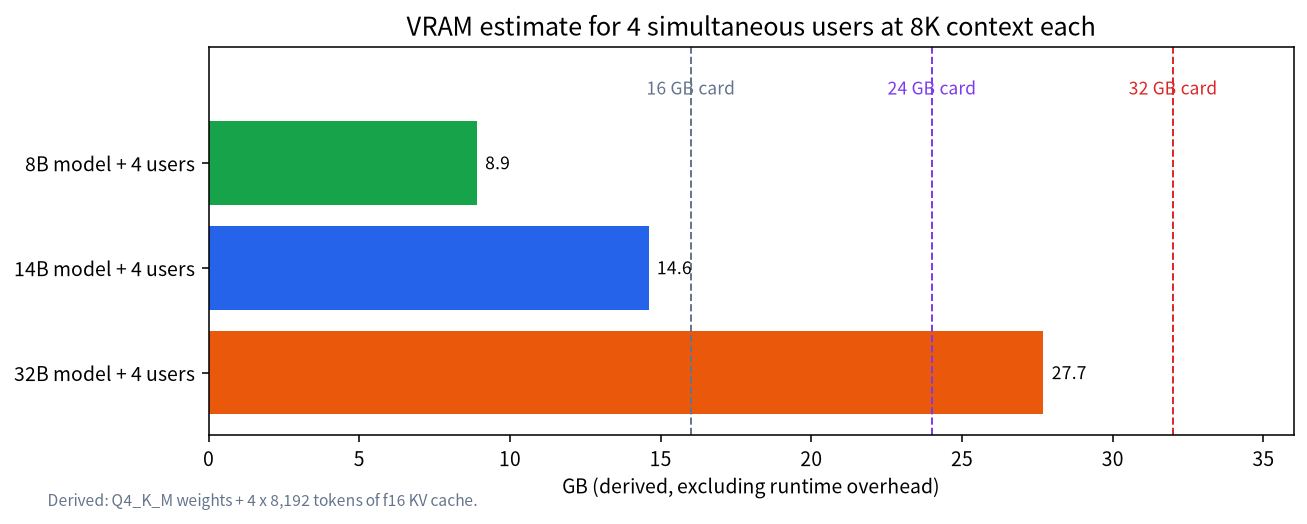
Two caveats apply. The estimates exclude runtime overhead and compute buffers, so leave a margin of a few gigabytes. And not all users are active at the same moment: people read answers and think, so concurrent requests are usually fewer than accounts. If the memory does not fit, requests queue, or the context per user must shrink. Ollama returns a 503 error when its queue is full, and the OLLAMA_MAX_QUEUE variable controls the queue length. Options for reducing memory include a smaller model, a shorter context and cache quantisation, all covered in our VRAM calculator guide.
Choosing Hardware for Three to Ten People
The right machine depends on the model you need. For drafting, summarising and Q&A, an 8B to 14B model often suffices, and a 16GB or 24GB card serves a handful of users. For stronger reasoning or coding help, 32B-class models need 32GB or more once several users are active. Two cards can split a model, as in our dual GPU guide, but add complexity.
| Tier | Reference price (CNY) | Memory | Suitable for |
|---|---|---|---|
| RTX 5060 Ti 16GB build | 10,853 | 16GB VRAM | 8B to 14B models, 2 to 4 active users |
| Used RTX 3090 build | 14,299 | 24GB VRAM | 14B models, several users |
| RTX 4090 build | 33,214 | 24GB VRAM | Same capacity as 3090, higher bandwidth |
| Mac Studio M5 Max 128GB | 41,749 | 128GB unified | Large models, few simultaneous users |
| DGX Spark 128GB | 42,500 | 128GB unified | Large models, few simultaneous users |
| RTX 5090 workstation | 65,737 | 32GB VRAM | 32B models with several users |
| Enterprise appliance, 32B tier | 150,000 | Vendor specific | Support contract, compliance needs |
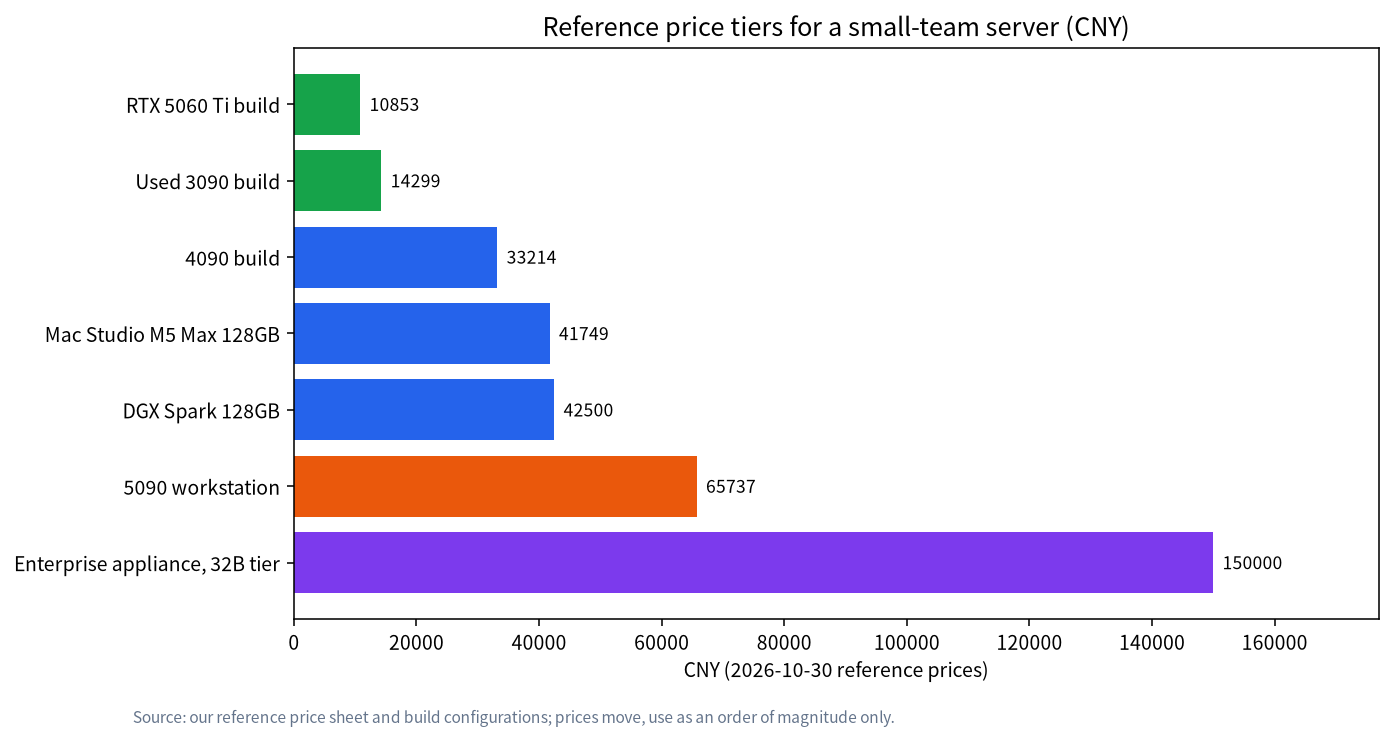
Memory capacity is not the same as speed. The unified-memory machines hold large models but have lower memory bandwidth than a high-end GPU, which usually means slower answers per user; we do not give speeds because we have not measured them. Prices are reference prices and the workstation and appliance rows come from fewer sources, so treat them as orders of magnitude. For help comparing complete machines, see our all-in-one buying guide.
Accounts, Roles and Network Access
The inference port should never be reachable by the team directly. Run the model server on localhost or a private interface, and expose only the web interface. Open WebUI describes role-based access control and user groups, with administrators defining roles and permissions, so you can separate administrators from ordinary users. Check its current documentation for the exact sign-up and approval settings in your version, and turn off open registration unless you want strangers to create accounts.
Add basic hygiene. Use HTTPS if the service crosses anything but a trusted wired network; our remote service guide covers the system side. Give each person their own account, never a shared password, so that you can remove access when someone leaves. Keep the administrator account for administration, not daily chat. Back up the web interface’s data, because chat history and settings live there, and keep the operating system and the software updated.
Rules for Data and Content
A shared server is only private if the team agrees on what goes into it. Write a one-page policy: which data may be pasted (for example public documents and internal drafts), which may not (customer personal data, credentials, contracts under confidentiality terms), who can see the logs, how long chat history is kept, and who to ask. Remember that a local server still stores prompts and answers on disk, so access to the machine means access to the conversations. Our privacy guide explains what stays local and what does not.
Rules about personal data and employee monitoring differ by country and by contract. We cannot give legal advice. If the team handles regulated or customer data, check with whoever is responsible for compliance before you put it into any AI system, local or not.
Fairness and Queues
Without limits, one person who pastes a very long document can slow everybody down. Set a sensible maximum context, keep the number of parallel requests within memory, and tell the team that long jobs belong at quiet times. If your gateway supports rate limits per user, use them; some web interfaces expose plugin hooks for this, so check the project’s current features. Watch the queue for the first weeks, because actual usage patterns teach more than any plan.
A Worked Example (Hypothetical)
Imagine a six-person team that wants a shared assistant for drafting and summarising. This is an illustration of the arithmetic, not a report of a real deployment. Six accounts do not mean six simultaneous requests; suppose the team expects at most three people to wait on an answer at the same time. A 14B Q4_K_M model has about 8.6GB of weights. With three parallel requests at 8K context, the KV cache is about 3 x 1.5GB, which is 4.5GB, so the total is about 13.1GB before overhead. A 16GB card is tight; a 24GB card leaves room for a longer context or a second small model for embeddings. The reference price of a used-3090 build is about CNY 14,299, and a 5060 Ti 16GB build is about 10,853, so the difference is a few thousand yuan for comfort.
Now suppose the team later wants a 32B model for harder tasks. Weights of about 19.7GB plus three users at 8K, about 6GB, is roughly 25.7GB. That no longer fits a 24GB card, which is exactly the point where either the context per user must shrink, the model must be a smaller quantisation, or the hardware must change. Doing this calculation before purchase prevents the most common regret in team setups: a machine that works for the demo but not for the second and third user.
A Four-Week Rollout Plan
Do not announce the service to everyone on day one. In week one, install and test with two volunteers, set the context and parallel settings, and confirm the memory use under load by watching VRAM while both ask long questions at once. In week two, add accounts for the pilot group, turn off open registration, and write the one-page data policy. In week three, expand to the full team, watch the queue and collect complaints, and adjust the maximum context. In week four, review what people actually use the service for, decide whether a bigger model or a second machine is justified, and set a date to review again. Keep a simple log of changes so that a problem after an update can be traced.
Who Owns the Server
A shared server needs an owner. Name one person responsible for updates, backups, account removal when people leave and answering questions, and name a backup person. Without that, the service decays: the model is never updated, the disk fills with old models, and nobody knows who can restart it. Decide in advance what happens during maintenance and tell the team when the service will be unavailable. If nobody wants this role, that is useful information: it may mean a managed cloud service, despite its trade-offs, suits your team better.
When to Move to vLLM or the Cloud
Ollama and llama.cpp suit teams of a few people. When more users arrive together, or you need the best use of each GPU, dedicated serving software such as vLLM, covered in our vLLM and SGLang introduction, is designed for batching many requests. The price is more configuration and a Linux-first workflow. Another route is to keep sensitive work local and send non-sensitive, heavy tasks to a cloud API; our local versus cloud comparison discusses the trade. Moving is easier if you built on the OpenAI-compatible API from the start, because clients only change a base URL.
Common Mistakes
- Sizing for one user. Each parallel user needs its own KV cache.
- Sharing one password. You cannot revoke a single person’s access.
- Exposing the model port. Only the web interface or gateway should be reachable.
- Leaving open registration on. Anyone who finds the address can create an account.
- Choosing by memory alone. Capacity is not speed; test with your own workload.
- No data policy. Users will paste whatever is convenient.
FAQ: Small Team Shared Local LLM
How many people can share one GPU?
It depends on the model, the context length and how often people actually send requests at the same time. Our estimate shows four users on a 14B model fit in about 14.6GB, but we have not load-tested any setup.
Do I need a separate GPU for each user?
No. The weights are shared, and each active conversation adds its own KV cache. Memory, not the number of accounts, sets the limit.
What happens when too many people ask at once?
Requests queue until memory frees up, and Ollama returns a 503 error if its queue is full, which OLLAMA_MAX_QUEUE adjusts.
Is a local server automatically private?
Prompts stay on your hardware, but they are stored there, so access control, backups and a data policy still matter.
Should we use Open WebUI?
It is a common choice, and its role-based access control and groups suit small teams; check its current documentation for the settings in your version.
When should we switch to vLLM or a cloud service?
When requests regularly queue, when you need better GPU utilisation, or when the team outgrows one machine.
Talk With Us
Planning a shared server for your team? Describe your use case in the community or email admin@microaione.com.
References: Ollama FAQ on concurrency, Open WebUI project, Open WebUI documentation, NVIDIA GeForce RTX 5090.