Why LLMs Need GPUs, Not CPUs: Memory Bandwidth and Compute Explained (With Speed-Ceiling Math)
Almost every local-LLM tutorial starts with “check your graphics card first.” Why LLMs need GPUs, not CPUs is usually answered with “GPUs have more compute,” which is only half true. What decides how many words per second you get is most often how fast data can be moved, meaning memory bandwidth. This article explains two things with as little math as possible: the two phases inside one answer and what limits each, and how much faster a GPU really is, why, and when a CPU is perfectly acceptable. All speeds here are theoretical ceilings computed from formulas, not measurements, and we mark them every time. To understand VRAM itself, read our GPU VRAM guide; to compute how much a model needs, see the VRAM calculator guide.
Key points (updated 2026-11-04)
- Generating each new token (decode) means reading the model weights from memory once, so the speed ceiling is roughly memory bandwidth divided by model size in bytes. It is a bandwidth problem.
Reading your prompt (prefill) is mostly matrix multiplication, a compute problem, where a GPU’s thousands of parallel cores help most.
For an 8B Q4_K_M model (about 4.9 GB): dual-channel DDR5-5600 has 89.6 GB/s theoretical bandwidth, a ceiling of about 18 tokens/s; an RTX 4090 has 1008 GB/s, a ceiling of about 206 tokens/s. Real speeds are lower.
If part of a 70B Q4_K_M model (about 43.1 GB) lives in system RAM, the RAM part drags everything down: in our example the ceiling drops from about 23.4 to about 3.6 tokens/s.
CPUs are not useless: small models, MoE models, short prompts and no-rush jobs are fine on CPU or Apple unified memory.
Why LLMs need GPUs, not CPUs: the two phases of one answer
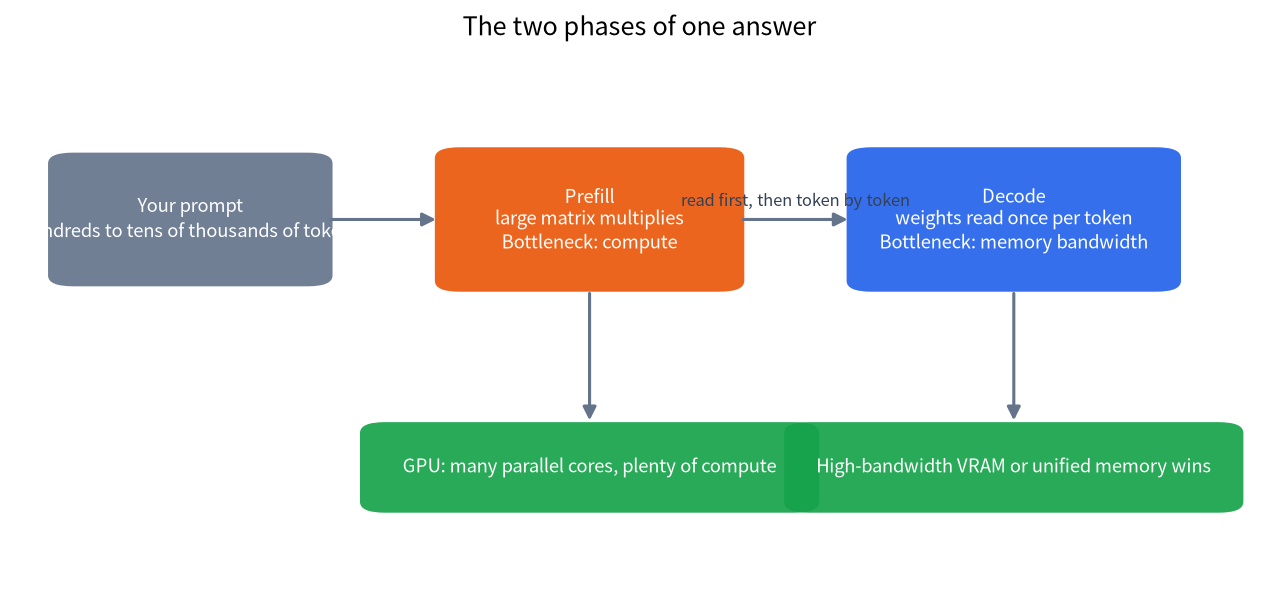
A complete answer has two phases whose physical bottlenecks are completely different.
| Phase | What happens | Main bottleneck | Who wins |
|---|---|---|---|
| Prefill | The whole prompt is read at once to build context | Compute (number of matrix operations) | GPU: thousands of parallel cores |
| Decode | The answer is generated one token at a time | Memory bandwidth (weights are read for every token) | Devices with high memory bandwidth: GPUs, Apple unified memory |
During prefill, hundreds or thousands of tokens enter the model together and the same weights are reused many times, so there is a lot of arithmetic per byte moved and compute is the limit. During decode only one token is produced per step but the weights (all active ones) must still be read, so there is little arithmetic per byte and bandwidth is the limit. NVIDIA’s inference-optimization material draws the same line: the decode phase is memory-bound.
How to compute the speed ceiling: bandwidth divided by model bytes
Decode has a handy estimate:
tokens per second (ceiling) ≈ memory bandwidth (GB/s) ÷ weight bytes read per token (GB)
For an ordinary dense model every token reads the entire model. The llama.cpp quantization documentation lists Llama-3.1-8B at Q4_K_M as about 4.9 GB, so we use 4.9 GB. Bandwidths are vendor-published specifications:
| Device | Bandwidth (GB/s) | 8B Q4_K_M ceiling (tokens/s) | Note |
|---|---|---|---|
| DDR5-5600 dual channel | 89.6 | about 18.3 | 5600 MT/s × 8 bytes × 2 channels, peak |
| RTX 4060 Ti 16GB | 288 | about 58.8 | NVIDIA spec |
| RTX 3060 12GB | 360 | about 73.5 | NVIDIA spec |
| RTX 5060 Ti 16GB | 448 | about 91.4 | NVIDIA spec |
| Apple M4 Pro | 273 | about 55.7 | Apple spec, unified memory |
| Apple M4 Max (top GPU configuration) | 546 | about 111.4 | Apple spec, unified memory |
| RTX 3090 | 936.2 | about 191.1 | NVIDIA spec |
| RTX 4090 | 1008 | about 205.7 | NVIDIA: 16,384 CUDA cores, 384-bit GDDR6X |
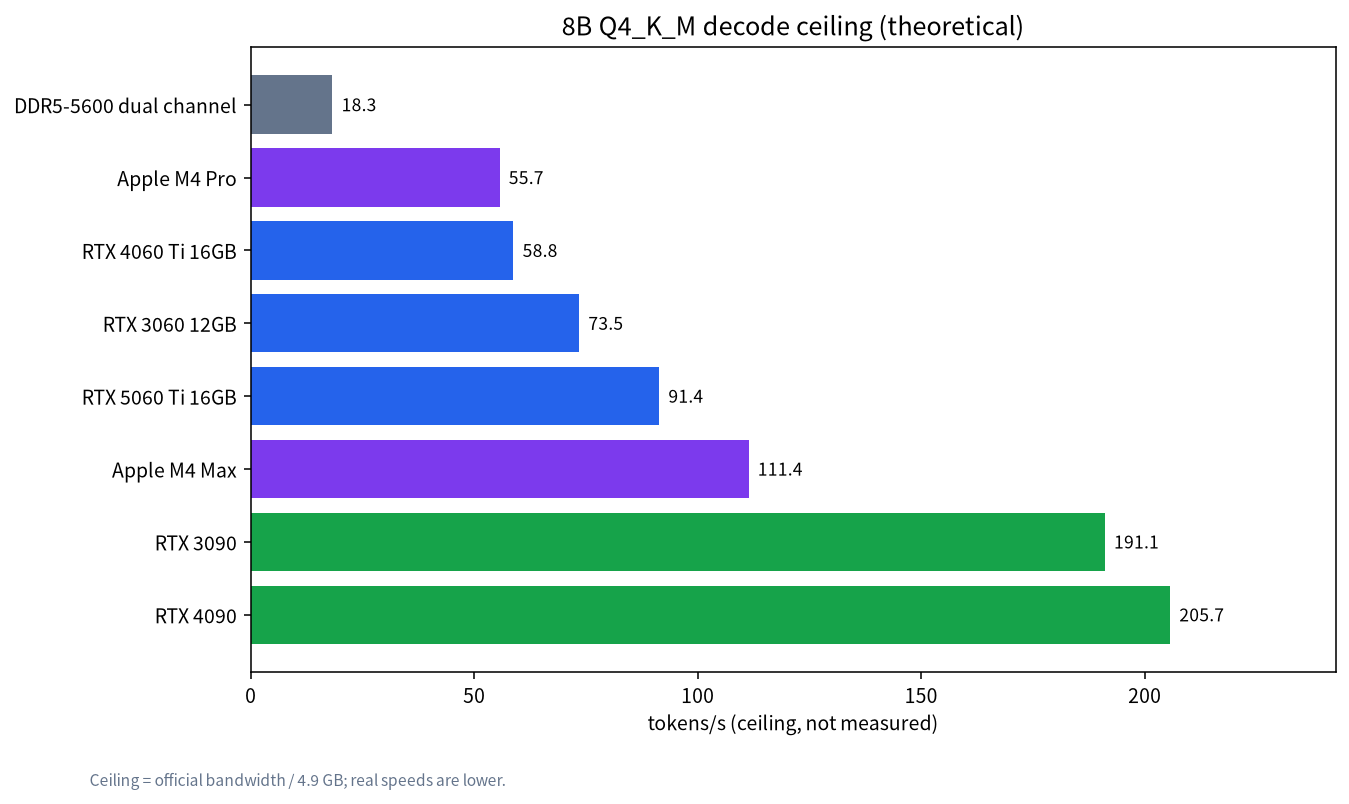
Three ways to read this table. First, for the same model, higher-bandwidth hardware raises the ceiling almost proportionally: the 4090 is about 11 times DDR5 dual channel, matching the bandwidth ratio (1008 ÷ 89.6 ≈ 11.25). Second, VRAM capacity and speed are different things: the RTX 4060 Ti 16GB has more memory than the 3060 12GB but less bandwidth, so its ceiling on a small model is lower. Third, these are ideal ceilings; kernel efficiency, KV-cache reads and scheduling overhead usually put real numbers well below them. We have not measured these devices; to learn how to read real benchmarks see how to read LLM benchmarks.
Why GPU parallelism pays off most in prefill
Prefill compute can be roughly estimated as floating-point operations ≈ 2 × parameters × prompt tokens, a common rule of thumb. For an 8B model reading a 4096-token prompt:
2 × 8×10⁹ × 4096 ≈ 6.55×10¹³ operations, about 65.5 TFLOP.
Time = operations ÷ sustained throughput. Sustained throughput depends on hardware and software, and we will not invent figures for specific products, so here is an order-of-magnitude view with assumed values:
| Assumed sustained throughput | Time to prefill 4096 tokens |
|---|---|
| 1 TFLOPS | about 65.5 s |
| 10 TFLOPS | about 6.6 s |
| 50 TFLOPS | about 1.3 s |
| 100 TFLOPS | about 0.66 s |
The throughput values above are assumptions to show magnitude, not measurements of any product. The point is that the longer the prompt (document Q&A, long context), the more prefill demands compute. On a CPU that feels like a long wait before the first word appears, while a GPU usually starts answering within a second or two. Core count is part of the reason: an RTX 4090 has 16,384 CUDA cores while mainstream desktop CPUs have roughly 6 to 24 cores.
What happens when the model does not fit in VRAM: a 70B offload example
Many people end up with “not enough VRAM, put the rest in RAM.” Then the slowest part sets the pace. Take 70B Q4_K_M (about 43.1 GB) and suppose an RTX 4090 (24 GB, 1008 GB/s) holds 20 GB of weights while the remaining 23.1 GB sits in dual-channel DDR5-5600 (89.6 GB/s):
- Read time per token = 20 ÷ 1008 + 23.1 ÷ 89.6 ≈ 0.0198 + 0.2578 = 0.2776 s
- Speed ceiling ≈ 1 ÷ 0.2776 ≈ 3.6 tokens/s
Compare the extremes: if all 43.1 GB sat in a hypothetical 1008 GB/s memory pool, the ceiling would be about 23.4 tokens/s; with everything in DDR5 on CPU only it would be about 2.1 tokens/s.
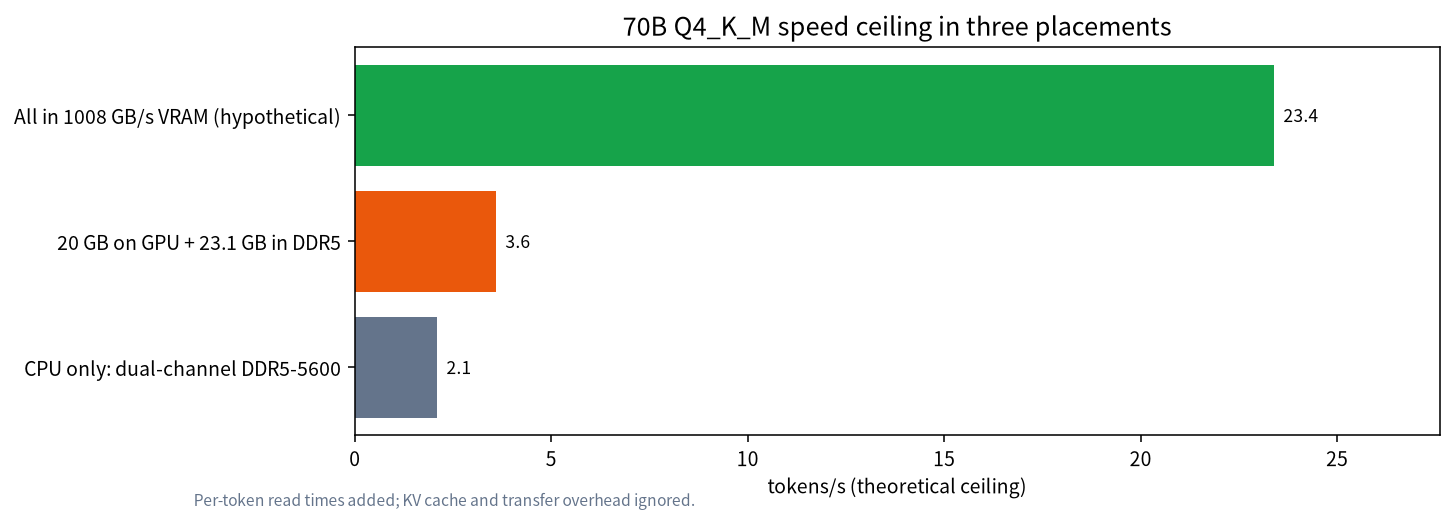
Only 46% of the weights are on the GPU, yet the ceiling is only about 1.7 times the CPU-only figure, because the slow segment decides the total time. This is why “not enough VRAM, make up with RAM” is so often disappointing, and why we suggest reading RAM vs VRAM and CPU offload before deciding what to buy. The example ignores the KV cache and transfer overhead, so real numbers are lower. Longer context also adds KV-cache memory, see context length and KV cache.
When a CPU is good enough
“GPU is better” does not make CPUs useless. In these cases a CPU or unified memory is reasonable:
| Scenario | Why it works | Watch out for |
|---|---|---|
| 1B–4B small models | Small files, fewer bytes per token, a higher ceiling than 8B | Answer quality is limited by the model |
| MoE models | Each token reads only the activated experts, far fewer bytes than total parameters | All weights must still fit, see MoE models locally |
| Short prompts, occasional use | Prefill is short, the wait is acceptable | Long-document Q&A gets noticeably slower |
| Apple silicon | High unified-memory bandwidth (M4 Pro 273 GB/s, M4 Max 546 GB/s) | Weigh capacity and price, see running local LLMs on Mac |
| Batch jobs, no deadline | Let it run overnight | Count power and run time |
Keep NPUs and “AI PCs” separate in your mind: they excel at low-power small-model tasks and are not a bandwidth answer for large-model decode, see AI PC and NPU explained. With many simultaneous users a GPU can also batch requests so one read of the weights serves several, which is what serving frameworks such as vLLM exploit; see vLLM and SGLang basics.
A quick trick: use the formula to spot inflated speed claims
Once you know “bandwidth ÷ model bytes,” you can run it backwards to check any speed claim. The steps: speed (tokens/s) × model file size (GB) = the effective bandwidth needed (GB/s). Suppose someone claims 30 tokens/s for an 8B Q4_K_M model (about 4.9 GB) on the CPU of a dual-channel DDR5-5600 PC. The implied bandwidth is 30 × 4.9 = 147 GB/s, above that memory’s 89.6 GB/s theoretical peak, so for a dense model the number cannot be right. Possible explanations include a model that is really MoE (only part of the weights is read per token), a lower quantization, speculative decoding, a prefill speed or batched total throughput being reported, or simply a different measurement definition. We do not judge any particular claim; this is a self-check method: compute the implied bandwidth first, then see whether it exceeds the hardware’s specification. For more on reading benchmarks see how to read LLM benchmarks.
What this means when buying hardware
Compressed into rules: capacity decides whether the model fits at all, and when it does not, speed drops off a cliff; once it fits, bandwidth sets the ceiling, so size alone is not the whole story; prefill needs compute, so long-prompt workloads need a strong GPU; and do not expect a CPU-only box to run a 70B dense model faster than about 2 tokens/s. For concrete choices return to the model size chooser and our hardware section.
How we checked this, and what we did not do
Bandwidth numbers come from NVIDIA and Apple official specifications, file sizes from the llama.cpp quantization documentation, and DDR5 bandwidth is the peak computed from the transfer rate. The ceilings and offload example are our own theoretical calculations, and the throughput values in the prefill table are assumptions used for magnitude. We did not benchmark any of these devices; real speeds are lower and vary with software version, quantization type and context length.
FAQ
Do LLMs have to run on a GPU?
No. They can run on a CPU, and llama.cpp and similar tools support CPU-only mode. But decode is limited by memory bandwidth, and CPU memory bandwidth is typically between a third and a tenth of a graphics card’s, so it is clearly slower.
Why does bandwidth affect speed more than VRAM capacity?
Capacity decides whether the model fits; bandwidth decides how many times per second the weights can be read. Once it fits, the ceiling is roughly bandwidth divided by model size, so higher bandwidth is faster.
How fast can an 8B model run on a CPU?
With dual-channel DDR5-5600, the theoretical ceiling for 8B Q4_K_M is about 18 tokens/s, and real results will be lower. This is a formula result, not our measurement.
Does lots of RAM mean I can run 70B?
Fitting is not the same as running fast. 70B Q4_K_M is about 43.1 GB; on dual-channel DDR5 alone the theoretical ceiling is about 2 tokens/s, and partial GPU offload is still dragged down by the RAM part.
Why are MoE models friendlier to CPUs?
An MoE model activates only some experts per token, so fewer weight bytes are read and bandwidth demands are lower, although all weights still have to fit in memory.
Can an NPU replace the GPU for large models?
Today NPUs mainly serve low-power small-model and system features; their bandwidth and software ecosystem do not replace a discrete GPU for large models, as our NPU explainer covers.
Want us to estimate your machine’s ceiling?
Join the community or email admin@microaione.com with your GPU, RAM and the model you want, and we will estimate a ceiling with the formulas in this article and suggest what to buy.
References: NVIDIA: LLM inference optimization techniques, NVIDIA GeForce RTX 4090 specifications, Apple introduces M4 Pro and M4 Max, llama.cpp quantization docs. Read on 2026-11-04.