Running LLMs on Intel GPUs: What Arc B580, Arc Pro B60 and Core Ultra NPUs Can Do (Speed From Bandwidth)
Local LLMs used to be almost entirely an Nvidia story. But the 249 USD Arc B580 with 12 GB of memory, the 24 GB Arc Pro B60, and Core Ultra laptops with a built-in NPU have people asking: is running LLMs on Intel GPUs actually a good idea? This article relies only on official spec pages and documentation, and splits the Intel platform into three questions: what fits in the card, which software route to take, and what the NPU is good for. For speed we compute a theoretical ceiling as bandwidth divided by model size, then say when buying makes sense and when to avoid pitfalls.
How we checked this: specifications come from Intel’s official spec pages and the Arc Pro B60 datasheet; software notes come from the Ollama, llama.cpp and OpenVINO documentation, all read on 2026-11-04. Speed numbers are formula-based ceilings, and we have not tested any of this hardware; real speeds depend on drivers, backend, quantization and context length. Individual user reports from the community are treated as leads, not conclusions.
Key points (updated 2026-11-04)
- Per Intel’s official specs, the Arc B580 has 12 GB, 456 GB/s and a 249 USD recommended price; the Arc Pro B60 has 24 GB, 456 GB/s and 120 to 200 W; the Arc Pro B50 has 16 GB, 224 GB/s and 349 USD.
By bandwidth divided by model size, the B580 and B60 have a theoretical ceiling of about 93 tokens/s on an 8B Q4 model (about 4.9 GB) and about 51 on 14B Q4 (about 9 GB). Real speed will be lower, and we did not measure it.
On software, Ollama’s documentation says Intel GPUs are supported through Vulkan; llama.cpp also has a SYCL backend; the IPEX-LLM repository is archived and should not be a dependency for new projects.
- The Core Ultra 200V NPU is rated at 48 TOPS (40 for Ultra 5). OpenVINO’s NPU guide includes an 8B export example, but models must be converted to symmetric 4-bit and the default prompt limit is 1,024 tokens, so it suits low-power small tasks rather than speed.
Running LLMs on Intel GPUs: start with memory and bandwidth
Generating each token reads almost all the weights once, so decode speed is capped at roughly memory bandwidth divided by model file size (the principle is in why LLMs need a GPU, not a CPU). Capacity decides whether it fits; bandwidth decides how fast it is. The cards in Intel’s official material:
| Card | Memory | Bandwidth | Official AI rating | Power | Price |
|---|---|---|---|---|---|
| Arc B580 | 12 GB | 456 GB/s | 233 INT8 TOPS | 190 W | 249 USD recommended price |
| Arc B570 | 10 GB | 380 GB/s | – | – | – |
| Arc Pro B60 | 24 GB | 456 GB/s | 197 TOPS | 120 to 200 W | Channel pricing varies |
| Arc Pro B50 | 16 GB | 224 GB/s | – | – | 349 USD (official material) |
Two points stand out. First, the B60 has the same bandwidth as the B580 but twice the memory, so it fits larger models without raising the speed ceiling. Second, 24 GB at an entry price is still scarce, which is the B60’s appeal, but it is a workstation product, so channel prices and availability must be checked.
Three software routes with different maturity
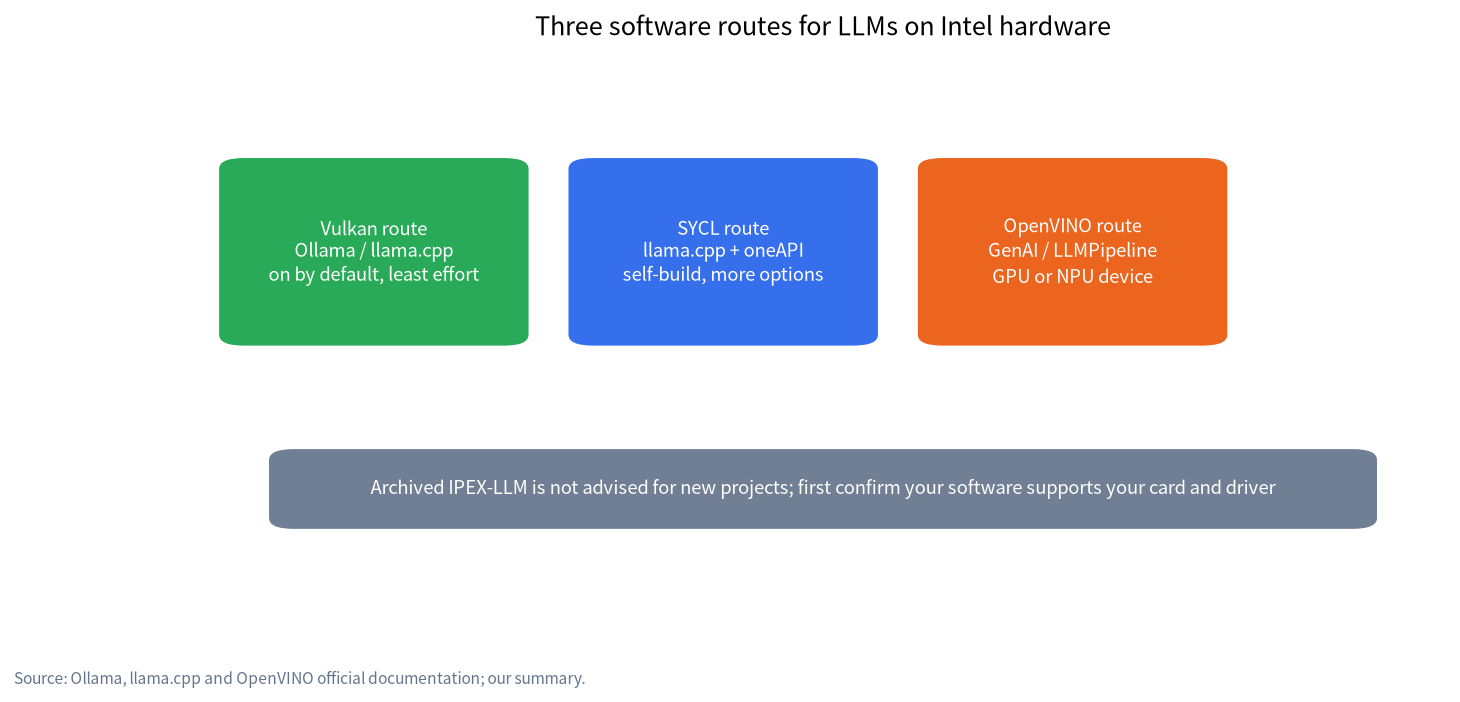
| Route | How to use it | Key points from official material | Who it suits |
|---|---|---|---|
| Vulkan | Ollama or llama.cpp Vulkan backend | Ollama’s GPU documentation says Intel GPUs are supported through Vulkan, enabled by default | People who want the least fiddling |
| SYCL | llama.cpp SYCL backend, needs oneAPI | llama.cpp has official SYCL documentation; in an Ollama issue a user proposing SYCL reported 10 versus 33 tokens/s on a B50 (a single user report we did not verify) | People willing to build their own and chase speed |
| OpenVINO | Intel’s own inference stack for CPU, GPU and NPU | OpenVINO GenAI offers LLMPipeline with a “NPU” device option | People who need small models on the NPU |
Intel’s earlier IPEX-LLM repository is also archived (per the official repository status), so new projects are better off looking at llama.cpp and OpenVINO. The realistic picture today is that it works, but there are more options than on Nvidia and maturity is uneven; confirm support in the software you plan to use before buying, and see Ollama GPU troubleshooting for common issues.
Speed from bandwidth: a ceiling table
We use common Q4_K_M sizes (8B about 4.9 GB, 14B about 9.0 GB, 32B about 20 GB) and the formula “ceiling = bandwidth / model size”. These are ideal values; kernel efficiency, context length and backend implementation usually keep real speeds below them.
| Device | Bandwidth | 8B Q4 ceiling | 14B Q4 ceiling | 32B Q4 ceiling |
|---|---|---|---|---|
| Arc B580 / Arc Pro B60 | 456 GB/s | about 93 | about 51 | about 23 (does not fit on B580) |
| Arc B570 | 380 GB/s | about 78 | about 42 | n/a (not enough memory) |
| Arc Pro B50 | 224 GB/s | about 46 | about 25 | n/a (not enough memory) |
| Arc 140V in Core Ultra 200V (theoretical bandwidth) | about 136.5 GB/s | about 28 | about 15 | about 7 |
| Arc 140V (about 80 GB/s real GPU throughput reported by Chips and Cheese) | about 80 GB/s | about 16 | about 9 | about 4 |
Note: Core Ultra 200V uses LPDDR5X-8533, and 136.5 GB/s is our own calculation of 8533 MT/s times a 128-bit bus, not an official bandwidth figure. The 80 GB/s number comes from Chips and Cheese’s test reporting and is for reference only.
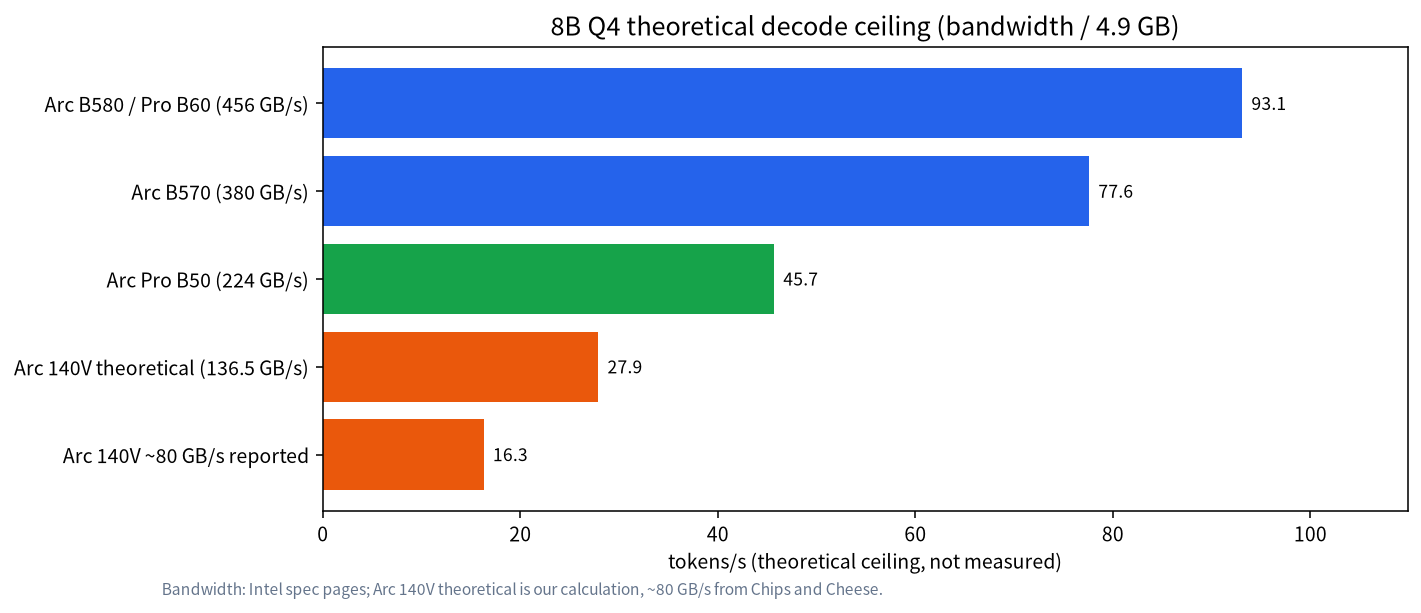
How to read it: if your goal is “8B to 14B is fast enough for daily chat,” the B580’s ceiling is far above human reading speed, so even half or less of it is usable. If you want 32B, you need the 24 GB B60, whose ceiling of about 23 tokens/s is usable but not fast.
What fits in memory
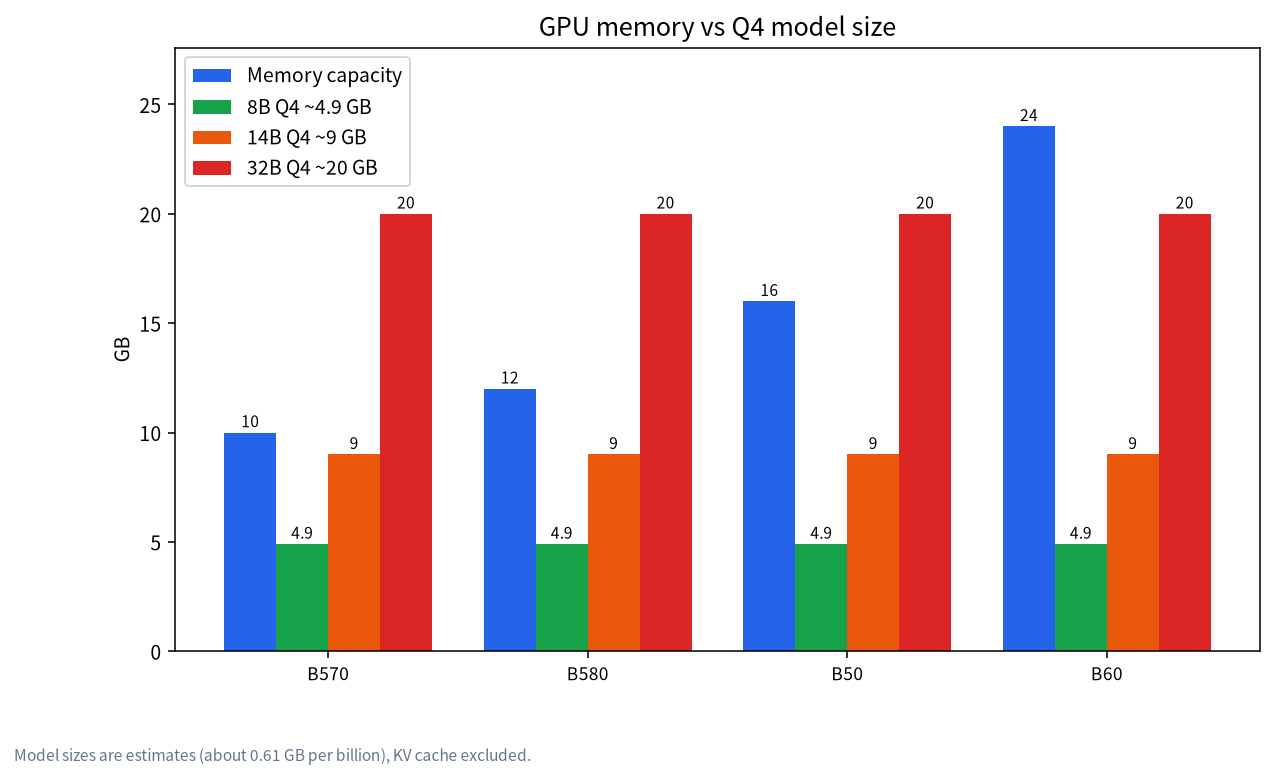
| Card | 8B Q4 (about 4.9 GB) | 14B Q4 (about 9.0 GB) | 32B Q4 (about 20 GB) |
|---|---|---|---|
| B570 10 GB | Fits | Very little headroom, context limited | Does not fit |
| B580 12 GB | Fits | Feasible, keep context short | Does not fit |
| B50 16 GB | Fits | Fits | Does not fit |
| B60 24 GB | Fits | Fits | Feasible, mind the KV cache |
The KV cache grows with context and takes extra memory; see context length and KV cache. Model sizes are estimates, and your actual file governs.
What the Core Ultra NPU is for
The Core Ultra 200V NPU is rated at 48 TOPS (40 for Ultra 5), the GPU is the 8-Xe-core Arc 140V, and memory is LPDDR5X-8533. OpenVINO GenAI’s NPU guide says to select the device with LLMPipeline(model, "NPU"); LLMs must be exported with symmetric (--sym) 4-bit weights (INT4 or NF4), and NF4 is supported only on Core Ultra Series 2 NPUs and later; its export examples include Llama-3.1-8B. The same guide lists limits: the NPU pipeline uses static shapes, with a default maximum prompt length of 1,024 tokens and a minimum response length of 128 tokens; on Core Ultra Series 2, models above 7B with prompts longer than 1,024 tokens may need more than 16 GB of RAM; compilation happens on the fly and can take a long time, which caching or ahead-of-time compilation can reduce; and for execution failures it suggests updating the NPU driver to 32.0.100.3104 or newer.
So the NPU’s value is low power and the ability to run alongside the CPU and GPU, which suits assistants, summaries and small offline models. Its bandwidth is bound by system memory, and the table above shows the Arc 140V ceiling is already only about 28 tokens/s on 8B, so do not expect the NPU to bring “high speed.” For more on the concept, see what AI PCs and NPUs are.
Intel versus Nvidia versus AMD
| Item | Intel Arc | Nvidia | AMD |
|---|---|---|---|
| Price per GB of memory | Competitive official prices (B580 12 GB at 249 USD) | Usually higher | Depends on model; see the AMD GPU guide |
| Software ecosystem | Usable, more options, needs checking | Most mature | Improving, needs checking |
| Entry memory | Official products at 12 to 24 GB | Depends on model | Depends on model |
| Fits | Tinkerers on a budget | People who want least effort | Budget-conscious buyers |
If you are considering used cards, also read cheap GPUs for LLMs to compare used Nvidia cards with new Arc ones. For what 12 to 16 GB can run, see the 12 GB and 16 GB VRAM guide.
Buying cheat sheet by goal
| Your goal | Leaning toward | Why (from the specs and estimates above) |
|---|---|---|
| Tight budget, mostly 7B to 8B | Arc B580 12 GB | Fits 8B Q4, high theoretical ceiling, 249 USD recommended price |
| Single-card 14B | B580 12 GB or B50 16 GB | 14B Q4 is about 9 GB; 16 GB leaves more context room |
| Single-card 32B Q4 | Arc Pro B60 24 GB | The roughly 20 GB of weights fit, watch the context |
| Laptop, low power, light tasks | Core Ultra 200V with NPU/GPU | Low power, but bandwidth limited; speed is not the selling point |
| Least software fiddling | Confirm software support first, consider Nvidia if unsure | Intel routes work but need more checking |
Before buying, run your own software and model in your own environment rather than relying only on theoretical values.
Common mistakes and pitfalls
- Looking at memory but not software. Fitting is not speed; confirm your software (Ollama, llama.cpp or OpenVINO) supports your card and driver.
- Treating NPU TOPS as speed. TOPS is a compute rating; generation speed is dominated by memory bandwidth.
- Treating the ceiling as real speed. The tables are upper bounds; real speed is lower, so trust your own testing.
- Ignoring warranty differences. Arc cards are new products, while used Nvidia cards differ in price and warranty.
- Ignoring context length. Long contexts take KV cache, which matters most when running 14B on 12 GB.
What we checked and what we did not do
Specifications come from Intel’s official spec pages and datasheet; software support from the Ollama, llama.cpp and OpenVINO documentation and GitHub repository status; the speed ceilings are formula results, and the Arc 140V real bandwidth comes from Chips and Cheese reporting. We have not run any hands-on tests on Intel GPUs or NPUs, and we did not verify individual community speed reports, so we draw no conclusions from them.
FAQ
Can Intel GPUs run LLMs?
Yes. Ollama’s documentation says Intel GPUs are supported through Vulkan, and llama.cpp has a SYCL backend. How well it runs depends on your software and driver.
How large a model can an Arc B580 12 GB run?
By our estimates an 8B Q4 model of about 4.9 GB fits easily, a 14B Q4 of about 9 GB fits with limited context, and a 32B of about 20 GB does not fit.
Is the Arc Pro B60 24 GB worth buying?
If you want a 32B-class Q4 model on a single card, 24 GB is the threshold. Its bandwidth matches the B580, so it is not faster, only able to hold larger models. Price and availability depend on the channel.
Can a Core Ultra NPU run LLMs?
Yes, with conditions. OpenVINO GenAI requires conversion to symmetric 4-bit, defaults to a 1,024-token prompt limit and shows an 8B export example; it suits low-power small tasks, not speed.
Are Intel GPUs slower than Nvidia for LLMs?
There is no single answer. At equal bandwidth the theoretical ceilings are similar, but real speed depends on software optimisation. We have not measured it and draw no conclusion.
What should I check before buying an Intel GPU for AI?
Confirm software support and drivers first, then memory and bandwidth, do not read NPU TOPS as speed, and leave memory for the KV cache.
Want help judging a configuration?
Join the community or email admin@microaione.com with your budget, target model size and operating system. Our Shenzhen team can help configure a setup, and will say plainly which parts we have not tested.
References: Intel: Arc B580 specifications, Intel: Arc Pro B60 datasheet (PDF), Ollama: GPU documentation, llama.cpp: SYCL backend, OpenVINO GenAI on NPU, IPEX-LLM repository (archived).