12GB vs 16GB VRAM for Local LLMs: What Runs, and RTX 3060, 4060 Ti or 5060 Ti
For anyone with a budget of a few thousand to ten-odd thousand yuan, the question that comes up most is whether to buy a 12GB or a 16GB graphics card. These two tiers are the mainstream choice: less than half the price of a 24GB build, and much roomier than 8GB. This guide explains 12GB vs 16GB VRAM for local LLMs and what each runs. We start from official data to estimate model sizes, then compare the RTX 3060 12GB, RTX 4060 Ti 16GB and RTX 5060 Ti 16GB on price and memory bandwidth, and give a theoretical speed ceiling that does not depend on our own measurements. For VRAM basics read how much VRAM is enough. For the smaller tier see the 8GB VRAM guide, and for the larger one the 24GB VRAM guide.
Verification note: Memory bandwidth comes from the Tom’s Hardware RTX 50 launch spec table and the rtxinference.com comparison table. For model sizes, the Q4_K_M file sizes of 8B and 70B come from the official llama.cpp quantize docs, and the rest are extrapolated at about 0.61 to 0.62GB per billion parameters, so they are estimates. Prices come from our 2026-10-30 reference price table (medians, not quotes). The speed ceilings are theoretical values from a formula that we did not measure, and real speeds are lower.
Key takeaways (Updated 2026-10-30)
- 12GB holds 4-bit models up to 14B; 16GB can hold 24B-class models, but with little room for context.
Speed ceiling is roughly memory bandwidth divided by model size: for a 14B model, about 52 tok/s for the 5060 Ti 16GB (448 GB/s), about 33 for the 4060 Ti 16GB (288 GB/s), and about 42 for the 3060 12GB (360 GB/s).
Reference prices: 3060 12GB new about 3475 yuan, 4060 Ti 16GB used about 4200 yuan, 5060 Ti 16GB new about 5599 yuan.
12GB vs 16GB VRAM for Local LLMs: Start With Model Size
Whether a model fits in VRAM depends first on the weight size. The official llama.cpp quantize docs give Llama 3.1 figures: the 8B at Q4_K_M is about 4.9GB and the 70B about 43.1GB, or roughly 0.61 to 0.62GB per billion parameters. Extrapolating, a 14B model is about 8.6GB, a 24B about 14.8GB and a 32B about 19.7GB.
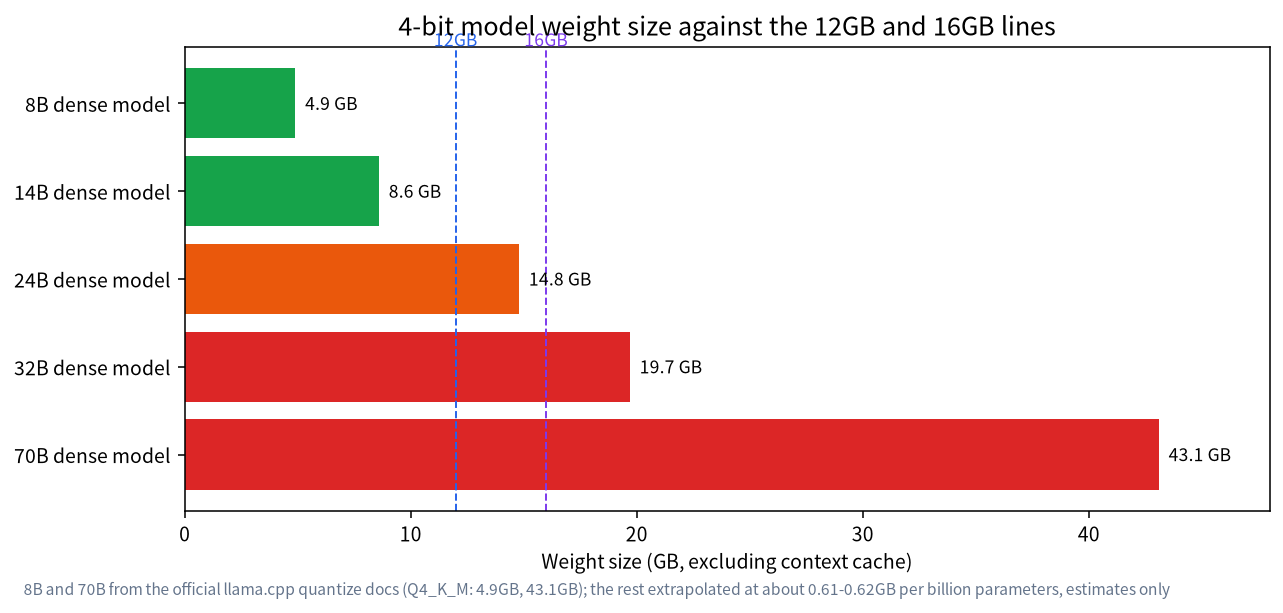
Note that the chart shows weights only, without the context cache or system use, for which you usually need another 1 to 3GB. So:
| VRAM | Weights that fit | Comfortable model size | Note |
|---|---|---|---|
| 12GB | up to about 10GB | 8B to 14B | A 14B at 4-bit is about 8.6GB, which with context is about right |
| 16GB | up to about 14GB | 14B to 24B | A 24B is about 14.8GB and tight with context, so shorten context or lower the quantization |
| 24GB | up to about 21GB | 30B to 32B | See our 24GB build article |
For a more exact calculation, use the method in our VRAM calculator guide, and for quantization trade-offs see Q4_K_M quantization.
Three Mainstream Cards Compared
| Aspect | RTX 3060 12GB | RTX 4060 Ti 16GB | RTX 5060 Ti 16GB |
|---|---|---|---|
| Memory | 12GB GDDR6, 192-bit | 16GB GDDR6, 128-bit | 16GB GDDR7, 128-bit |
| Memory bandwidth | 360 GB/s | 288 GB/s | 448 GB/s |
| Reference price (CNY, median) | 3475 (new) / 2050 (used) | 4200 (used, discontinued) | 5599 (new), about 618 USD in the US |
| CNY per GB of VRAM | about 290 (new) / 171 (used) | about 263 | about 350 |
| Best for | The lowest budget, mainly up to 14B | You want 16GB at low power and accept used | You want 16GB with a new-card warranty and the highest bandwidth |
Prices are the 2026-10-30 median references. The used 3060 and 4060 Ti prices rest on a single source, so go by the real market. For how to inspect used cards, see our guide to used GPUs for local LLMs.
One counter-intuitive point: the 4060 Ti 16GB has lower memory bandwidth (288 GB/s) than the 3060 12GB (360 GB/s). It has more capacity, but it reads data more slowly. The 5060 Ti 16GB moves to GDDR7 and reaches 448 GB/s, about 56% more than the 4060 Ti, which is the main reason it is friendlier to local LLMs.
Bandwidth Sets the Speed Ceiling
To generate each token, a model reads its weights once, so the theoretical generation ceiling is roughly memory bandwidth divided by model size. For a 14B model of 8.6GB, the bandwidths above give:
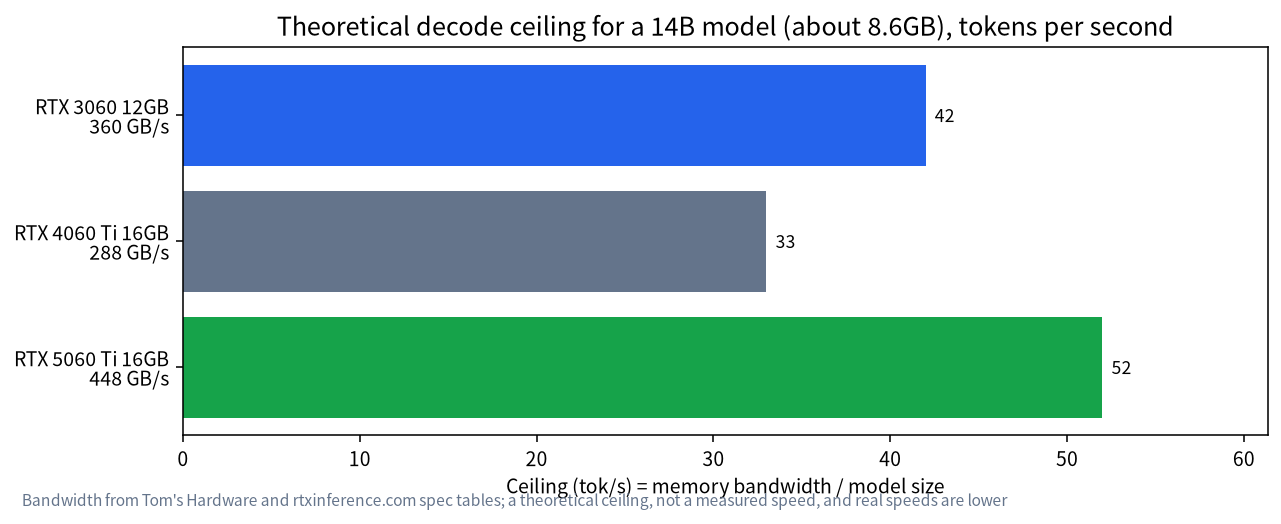
- RTX 3060 12GB: 360 / 8.6, about 42 tok/s
- RTX 4060 Ti 16GB: 288 / 8.6, about 33 tok/s
- RTX 5060 Ti 16GB: 448 / 8.6, about 52 tok/s
These are theoretical ceilings and not measured speeds, and real ones fall lower because of software, context length and compute overhead. Their value is in comparison: for the same 14B model, the 5060 Ti’s ceiling is about 56% above the 4060 Ti’s and about 24% above the 3060’s. A 24B model of about 14.8GB does not fit in 12GB, and on 16GB cards the ceiling is about 19 tok/s for the 4060 Ti and about 30 for the 5060 Ti. The prefill phase, where a long prompt is read in, depends more on compute than bandwidth, and we leave it aside here.
Everyday Tasks by VRAM Tier
Model sizes are abstract, so think in tasks. A 12GB card handles everyday chat and Q&A, polishing and drafting text, simple code completion and explanation, and a small knowledge base built on an 8B to 14B model, as described in our guide to building a local knowledge base. None of this is extreme, and a 14B-class model already gives quite usable results. A 16GB card adds two kinds of room: you can switch to a more capable 24B-class model, and you can open a longer context on a 14B model for longer documents or conversations.
If your main need is summarising long documents, complex multi-step reasoning or understanding a large code base, those tasks need both a bigger model and a very long context, and 16GB will often be tight too. Then consider the 24GB build, or accept handing part of the work to a cloud model. Our advice is to spend a month watching what you actually do before deciding on an upgrade, rather than aiming for the largest VRAM from the start.
How Much the Context Cache Costs
After the weights, the context (KV) cache is the second big VRAM cost. It grows linearly with context length, and the exact figure depends on the model’s layers and attention design, which vary widely, so we give no fixed number. Instead, here is a practical method: after loading a model, set the context to 4096, note the VRAM use in nvidia-smi, then double the context and note it again. The difference is the VRAM that model needs for each extra 4096 tokens. That lets you measure on your own card how long a context you can open, without relying on someone else’s estimate. Ollama also has environment variables for adjusting context length, described in its official docs.
Power, Size and Case
All three cards draw modest power: about 170W for the RTX 3060 12GB, about 160W for the RTX 4060 Ti 16GB and about 180W for the RTX 5060 Ti 16GB. An ordinary 550W to 650W power supply is enough, and you do not need an especially large case. That is another advantage over a 24GB build: a quieter, lower-power machine, friendly to a home or office. Card dimensions still differ a lot between brands, so measure the card length your case can take before you buy.
How to Choose
- Budget under 3500 yuan, mainly 7B to 14B: RTX 3060 12GB, new or used. For a whole-machine plan see our entry-level build.
- You want 24B-class models or a longer context: go for 16GB. For a new card with warranty choose the 5060 Ti 16GB; if you accept used and value low power, consider the 4060 Ti 16GB, with its lower speed ceiling.
- Mainly 30B and above: look straight at the 24GB build, because 16GB cannot hold a 4-bit 32B model.
- Is 16GB worth the extra? The 5060 Ti 16GB costs about 2124 yuan more than a new 3060 12GB and brings 4GB more VRAM and about 24% more bandwidth. If you only run models up to 14B, the money may not be worth it.
Three Questions Before You Order
First: how big is the 4-bit file of the model you use most? If it is over 9GB, a 12GB card will struggle, so look straight at 16GB. Second: how long a context do you need? If it often exceeds 8000 tokens, leave more VRAM. Third: do you care most about price, bandwidth or a new-card warranty? Price points to the 3060, bandwidth and warranty to the 5060 Ti, and used with low power draw to the 4060 Ti. Writing down the answers to these three questions usually settles it, and it stops you paying for performance you will not use.
Confirm the Model Really Sits in VRAM
After buying the card, the most important check is that the model loads 100% on the GPU. With Ollama, load a model and run ollama ps, then check that the PROCESSOR column shows 100% GPU. If it shows a CPU and GPU mix, some layers are in system memory and speed will drop sharply. Pick a smaller model, lower the quantization or shorten the context, and see Ollama not using the GPU for other causes.
Common Misconceptions
- “16GB is always faster than 12GB.” Not necessarily. Capacity only means larger models fit; speed mostly follows bandwidth, and the 4060 Ti 16GB has less bandwidth than the 3060 12GB.
- “If it fits, I can ignore context.” The context cache takes extra VRAM, and opening it too wide still runs you out of memory.
- “The newest card is the best.” For local LLMs, VRAM capacity and bandwidth matter more than the age of the architecture.
- “The lower the quantization the better.” Lower quantization means a smaller file but lower quality, so choose the highest quantization that still fits.
FAQ: 12GB and 16GB Cards
Is 12GB of VRAM enough for local LLMs?
It handles 8B to 14B models at 4-bit, which covers everyday chat, writing and Q&A. It is not enough for models of 30B and above.
Can 16GB run a 32B model?
A 4-bit 32B is about 19.7GB (estimated), which does not fit in 16GB. Part must be offloaded to system memory and speed drops a lot. A 32B suits a 24GB build better.
Is the RTX 3060 12GB still worth buying?
If your budget is limited and you mostly run models up to 14B, it is still good value. A used one is cheaper but needs inspection.
How do the 4060 Ti 16GB and 5060 Ti 16GB differ?
The capacity is the same, but the 5060 Ti uses GDDR7 at 448 GB/s, about 56% above the 4060 Ti’s 288 GB/s. It also costs more and, being new, has a warranty.
Why does the 12GB 3060 have more bandwidth than the 16GB 4060 Ti?
The 3060 12GB has a 192-bit memory bus and the 4060 Ti only 128-bit, so despite the larger capacity, the latter has lower bandwidth.
How far is the theoretical ceiling from real speed?
It varies with software and settings, and we did not measure it, so treat the ceiling as a comparison tool, not a promised speed.
Need Help Choosing a Card?
If you are torn between several cards, talk to us in the community or email admin@microaione.com with the models you want to run and your budget. For the beginner route read how to run an LLM locally, and for picking models see the best local LLM guide.
References and further reading: Tom’s Hardware: RTX 5060 Ti launch specifications, rtxinference.com: RTX 30/40/50 comparison, llama.cpp: quantize docs.