What On-Device LLMs Are: Phones, NPUs, and Real Use Cases
On-device LLMs are large language models that run directly on the hardware in your hand or on your desk, such as a phone, tablet, laptop, AI PC, car, or camera, instead of sending your request to a distant data center and waiting for the reply. In China the term is “端侧大模型”, literally “the model on the device side”. Phone launches over the past two years have been full of phrases like “on-device AI” and “device-cloud collaboration”, and this is what they mean. This article explains, in plain language, what on-device LLMs are, which ones exist, what they are actually useful for, and how an ordinary user can try a small Qwen model on an Android phone.
Verification note: Vendor products and model details reflect public information as of November 2026. Device support changes quickly, so check official pages. Model sizes and speeds are order-of-magnitude estimates, not benchmarks.
Key points (updated 2026-11-05)
- An on-device LLM runs inference locally. Data stays on the device and it works offline.
Typical sizes range from a few hundred million to several billion parameters, quantized to a few gigabytes.
Examples: phone makers’ built-in models, Gemini Nano, Apple’s on-device model, and small open models from Qwen, Gemma, Phi, and Llama.
Good for summaries, rewriting, translation, voice assistants, and photo search. Weak at complex reasoning and long-form writing.
Android users can run small Qwen models with open-source apps built on MNN or MLC.
What on-device LLMs are, and how they differ from cloud models
Most AI chat services are cloud models. You type on your phone, the text travels to the provider’s servers, a cluster of hundreds or thousands of GPUs computes an answer, and the reply comes back. That gives you the strongest models available, but it needs a network connection and it means your content passes through someone else’s servers.
On-device models flip that around. The model file lives on your device, and the device’s own chips do the work: the CPU, the GPU, or an NPU (neural processing unit) designed specifically for AI workloads. The benefits are privacy, offline use, and low latency. The limits are memory, compute, and battery, which is why only fairly small models fit.
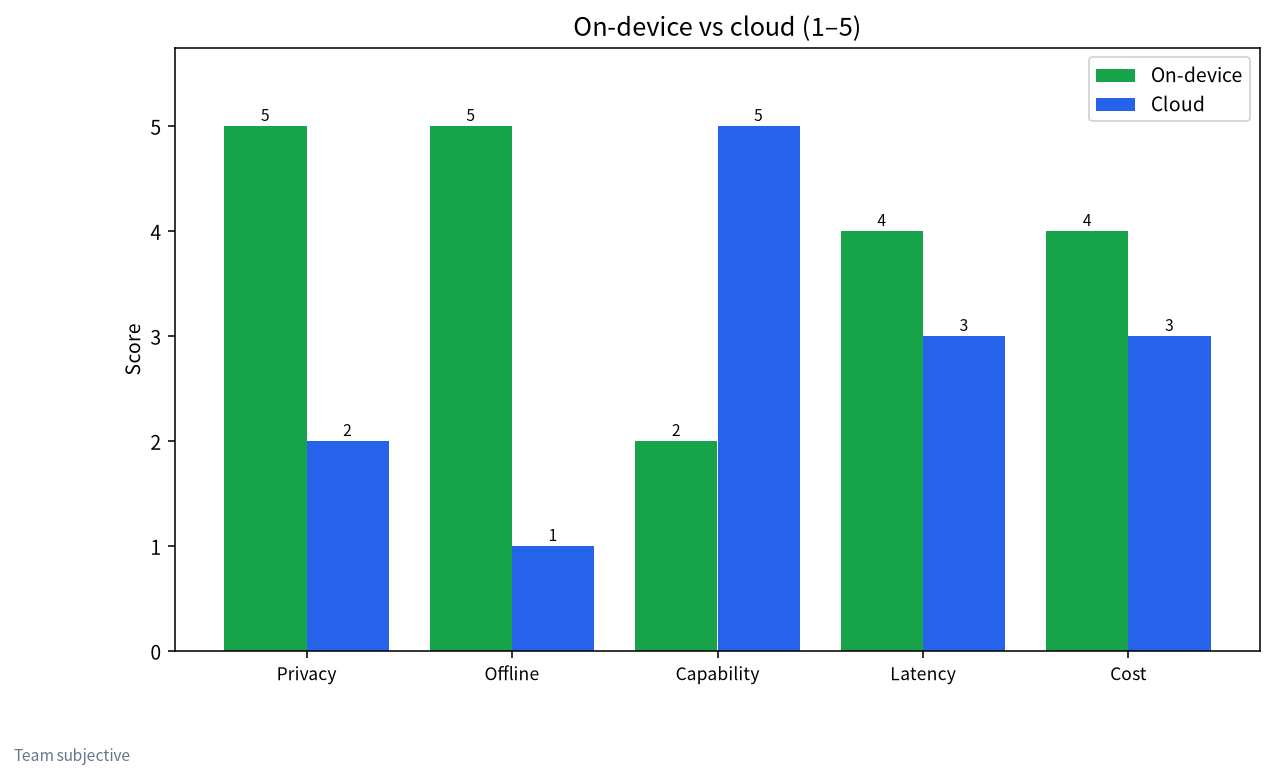
| Dimension | On-device LLM | Cloud LLM |
|---|---|---|
| Where it runs | Your phone or computer | Provider’s data center |
| Model size | Usually 1B–8B, a few GB quantized | Tens of billions to trillions of parameters |
| Needs internet | No | Yes |
| Data privacy | Data stays on device | You trust the provider |
| Latency | No network round trip; fast first token | Depends on network and queues |
| Capability ceiling | Light tasks | Stronger at complex reasoning and long writing |
| Cost model | One-time device cost, battery use | Subscription or pay per use |
On-device is the same idea this site covers as “local deployment”, just on smaller hardware. For a full introduction on desktops, see what a local LLM is. For whether you can use one with no connection at all, see does offline AI need internet.
Which on-device LLMs exist
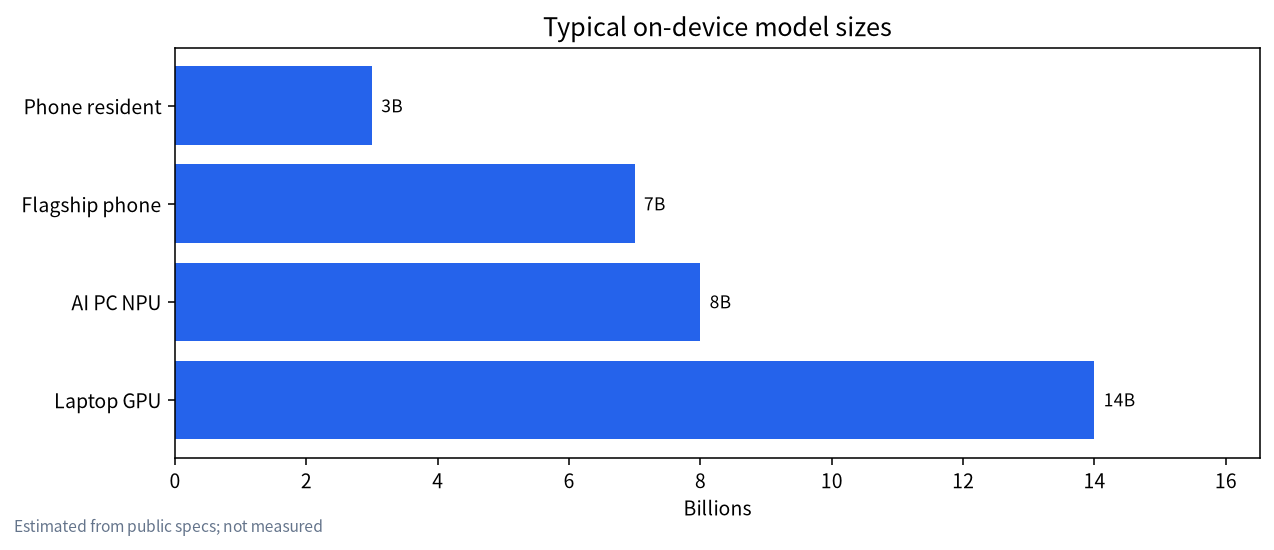
They fall into three broad groups.
Built-in models from phone and PC makers. Nearly every major Chinese phone brand now ships its own on-device model for system features like call summaries, text polishing, object removal in photos, and the voice assistant. Apple Intelligence runs a model of roughly three billion parameters on the device and hands harder requests to the cloud. Google offers Gemini Nano on Pixel and selected Samsung phones. These models usually do not have downloadable weights; you use them through system features and developer APIs.
Small open models. Alibaba’s Qwen family includes small sizes from about 0.5B to 4B. Google’s Gemma, Microsoft’s Phi, and Meta’s Llama all have editions suited to devices. You can download these to a phone or laptop and run them with open-source tools. Our best local LLM models list helps you choose.
Models on AI PCs. New laptops with an NPU can run quantized 7B–8B models at low power. Microsoft set a bar of 40+ TOPS of NPU performance for Copilot+ PCs. We explain what an NPU is and whether it matters in AI PCs and NPUs explained, and cover Intel hardware in running LLMs on Intel GPUs and NPUs.
| Group | Examples | Downloadable? | Typical use |
|---|---|---|---|
| Built-in | Phone makers’ models, Gemini Nano, Apple’s on-device model | Usually not | System features, assistants |
| Small open models | Small Qwen, Gemma, Phi, small Llama | Yes | Custom apps, offline Q&A |
| AI PC models | NPU-optimized builds from vendors | Some | Office assistants, local knowledge bases |
What on-device LLMs are good for
People often ask what a small model can possibly do. The answer is that on-device models shine at exactly the tasks that are frequent, lightweight, and private:
- Call and meeting summaries. Audio never leaves the phone; it is transcribed and summarized locally.
- Rewriting and reply suggestions. Polishing, shortening, or changing tone inside the keyboard.
- Offline translation. Useful abroad with no data connection.
- Photo and file search. Natural-language queries like “beach photos from last summer”.
- Personal knowledge. Question answering over your own notes without uploading them.
- Accessibility. Describing on-screen content for blind and low-vision users, where speed and privacy both matter.
Tasks that need heavy reasoning, long writing, or deep specialist knowledge trip up small models. Those belong in the cloud or on a more powerful local machine at home. Most real products are hybrids: simple requests stay on the device, harder ones go to the cloud with user consent. For desktop options, see our best offline local AI apps.
Running a local LLM on a phone: the hardware that matters
On a phone, the deciding factor is not processor speed but memory. A 3B model quantized to 4 bits is about 2 GB; a 7B model is about 4 GB. Add the operating system and other apps, and an 8 GB phone handles around 3B comfortably, while 12–16 GB flagships are where 7B becomes reasonable. Next comes NPU and GPU performance, which sets tokens per second. Last are heat and battery: thermal throttling after a few minutes of continuous generation is normal.
| Phone RAM | Suggested model size | Experience |
|---|---|---|
| 6 GB | 0.5B–1.5B | Runs; simple answers |
| 8 GB | 1.5B–3B | Usable for Q&A and rewriting |
| 12 GB | 3B–4B | Fairly smooth; can summarize |
| 16 GB+ | 7B–8B quantized | Close to small desktop models; noticeable heat |
Our article on running LLMs on a phone goes deeper into devices and testing.
How to run Qwen on Android: three approaches
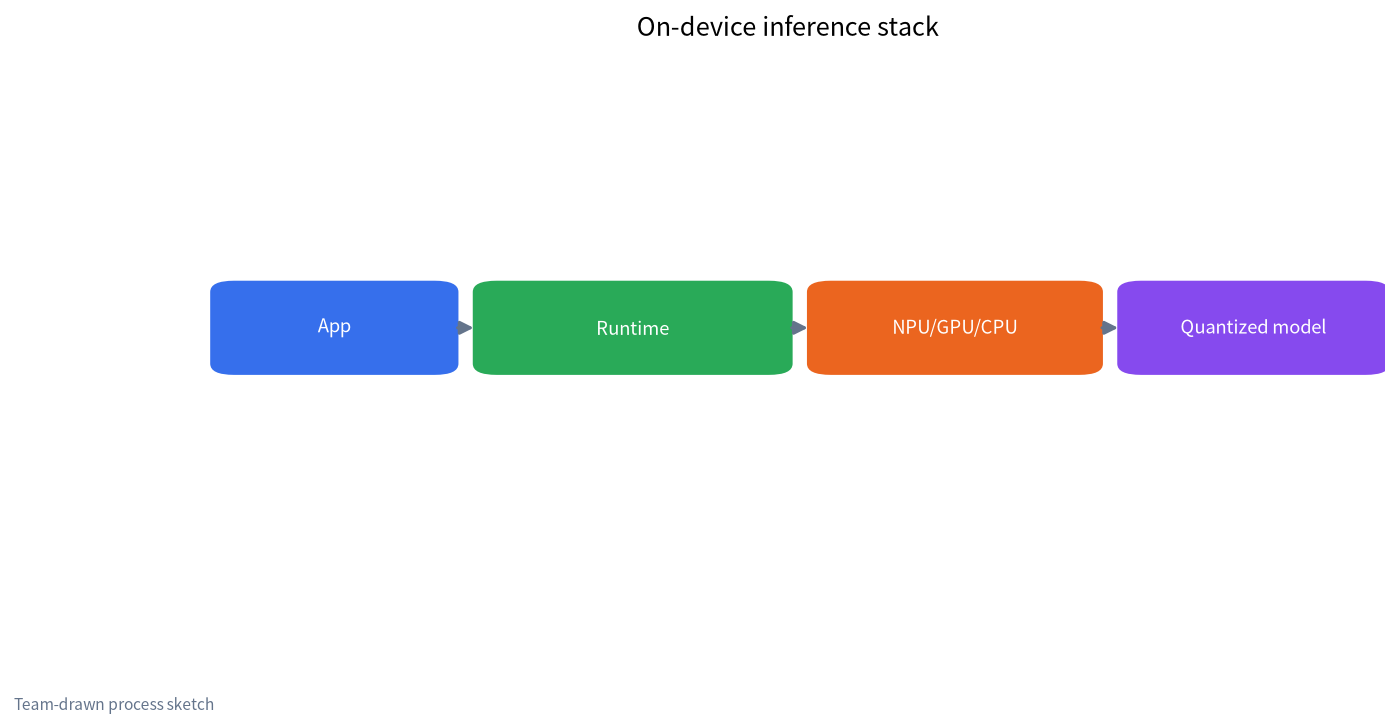
Approach 1: an MNN-based app. Alibaba’s open-source MNN inference framework includes an Android LLM app that can download small Qwen models and chat with them directly. This is the easiest route for regular users. Get the APK from the official GitHub releases page or a trusted app store.
Approach 2: MLC LLM and similar frameworks. MLC LLM compiles models to run on Android GPUs and ships a sample app. You can also package the Qwen model you want yourself. Good for people comfortable with some tinkering.
Approach 3: llama.cpp in Termux. Enthusiasts can compile llama.cpp in an Android terminal environment and load Qwen GGUF files. It is flexible but has the steepest learning curve and is usually slower than mobile-optimized options.
Whichever route you choose, download apps and models only from official sources, use Wi-Fi for model downloads, and leave plenty of free storage. If model downloads are slow from China, see the Hugging Face mirror guide.
Limits and common misconceptions
The first misconception is that on-device means perfectly safe. Keeping data on the device lowers leak risk, but the app may still upload logs or request permissions it does not need, so read its privacy policy. The second is that on-device models can replace the cloud. Today’s models with a few billion parameters still lag large cloud models on factual accuracy and complex reasoning, so verify anything important. The third is that bigger is always better. Forcing a model larger than memory allows only causes crashes and heat. Matching size to device gives a better experience. If you want stronger local capability, the usual answer is a local LLM PC at home that your phone calls over the home network.
Phone, home PC, or cloud: a simple way to decide
A useful mental model is three tiers. The phone handles quick, private, always-available tasks: rewriting a message, summarizing a voice memo, translating a sign. A home PC or small server with a decent GPU handles the middle: longer documents, a private knowledge base, coding help, and models in the 14B–32B range that a phone cannot hold. The cloud handles the hardest problems where you need frontier capability and are comfortable sending the data.
Ask three questions about any task. Is the data sensitive enough that it should not leave your hands? Then stay on the phone or the home PC. Does it need to work with no connection, such as on a plane or in a basement office? Then it has to be on the device. Does a wrong answer carry real cost, such as legal, medical, or financial decisions? Then use the strongest model available and check the result yourself, whatever tier it runs on.
Many people end up with all three. The phone runs a small model for daily convenience, a home machine runs Ollama or LM Studio with a mid-size model reachable over Wi-Fi, and a cloud subscription is kept for the occasional hard problem. Our local vs cloud API comparison walks through the cost side of that decision.
Where on-device LLMs are heading
Three trends are worth watching. Memory on flagship phones keeps rising, which directly raises the model size that fits. Model makers are training small models specifically for devices, using distillation from larger models and quantization-aware training so that 4-bit versions lose less quality. And operating systems are exposing on-device models to app developers through standard APIs, so third-party apps can use the system model instead of each shipping its own multi-gigabyte file. Together these mean the on-device tier will keep absorbing tasks that needed the cloud a year earlier, while the hardest work stays on bigger machines. For buyers, the practical takeaway is simple: if on-device AI matters to you, prioritize RAM over almost every other spec when choosing your next phone or laptop, because memory is the ceiling that software updates cannot raise later.
FAQ
What is an on-device LLM?
A large language model that runs locally on an end device such as a phone, computer, or car. The device’s own chips do the computation, with no cloud server involved, and data stays on the device.
Which on-device LLMs are there?
Phone makers’ built-in models, Google’s Gemini Nano, Apple’s on-device model, and small open models such as Qwen, Gemma, Phi, and Llama.
What are on-device LLMs used for?
Frequent, lightweight, privacy-sensitive tasks: summaries, rewriting, translation, photo search, voice assistants, and Q&A over personal notes.
What phone do I need to run a local LLM?
Memory matters most. 8 GB suits models around 3B; 12–16 GB lets you try 7B-class quantized models. NPU performance and cooling affect speed.
Is it hard to run Qwen on Android?
With a ready-made MNN-based app it is easy: install the app and pick a model inside it. MLC LLM or Termux routes need more technical skill.
Can on-device models be jailbroken?
Like any model, they can be pushed into producing inappropriate output. This site covers explanations and defenses only, never bypass methods; see our jailbreak defenses explainer.
Share your on-device setup
Tell us your phone model and experience in the community or email admin@microaione.com. Our Shenzhen team keeps a running list of device and model pairings.
Sources: MNN on GitHub, MLC LLM docs, Gemini Nano developer docs, Qwen on Hugging Face.