Local LLM PC Guide: How to Choose Three Budget Builds
Search for a local LLM PC and you will hear two extremes: “just buy a 4090” or “any laptop is fine.” Both miss the point. A useful local LLM PC recommendation starts from your weekly tasks, how many hours you run models, and whether you accept quantization—then maps those needs onto an entry host, a 24GB main machine, or a heavy workstation. This article gives three concrete budget builds, compares mini hosts with desktops, and points to our deeper guides on VRAM, 4090 capacity, and rent-versus-buy math.
Verification notes. Component prices are a China mid-price snapshot from 2026-10-30 and are not store quotes. Model-size-to-VRAM mappings follow public Q4_K_M-style heuristics and are not full-system benchmarks from our lab. Power and noise were not lab-measured. For formulas see our VRAM calculator guide and GPU VRAM guide.
Key takeaways (updated 2026-11-05)
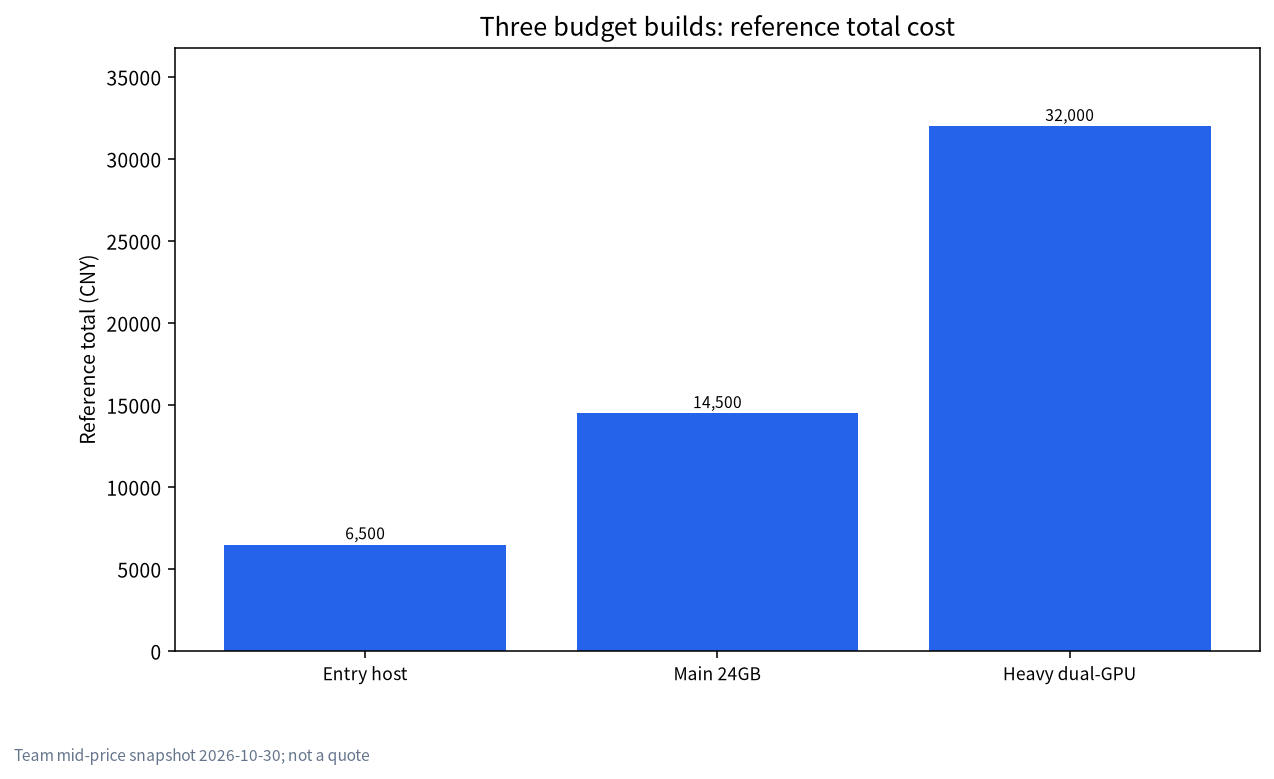
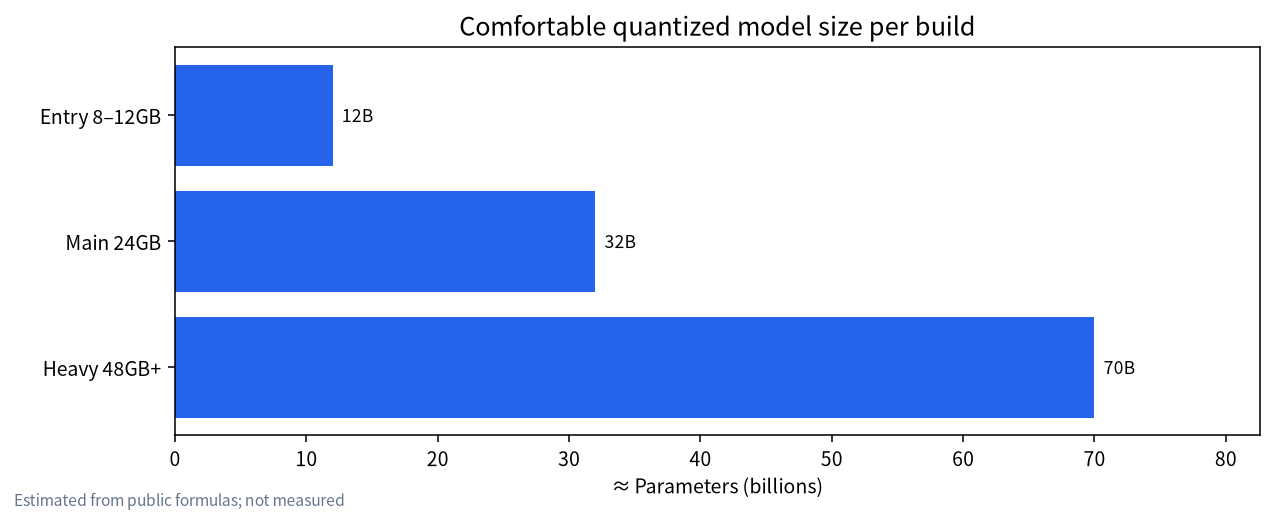
- Entry host (~CNY 6.5k class, 8–12GB VRAM): comfortable for 7B–12B quantized chat and light writing.
Main host (~CNY 14.5k class, 24GB): comfortable up to ~32B quantized; solid for coding assistants and local RAG.
Heavy host (~CNY 32k+, 48GB+ or dual GPU): 70B-class quantized work, longer context, or light LoRA—or rent a GPU instead.
- Mini hosts save space and power but upgrade poorly; desktops swap GPUs more easily. Appliances vs DIY: all-in-one vs DIY.
Local LLM PC: pick the workload, then the VRAM
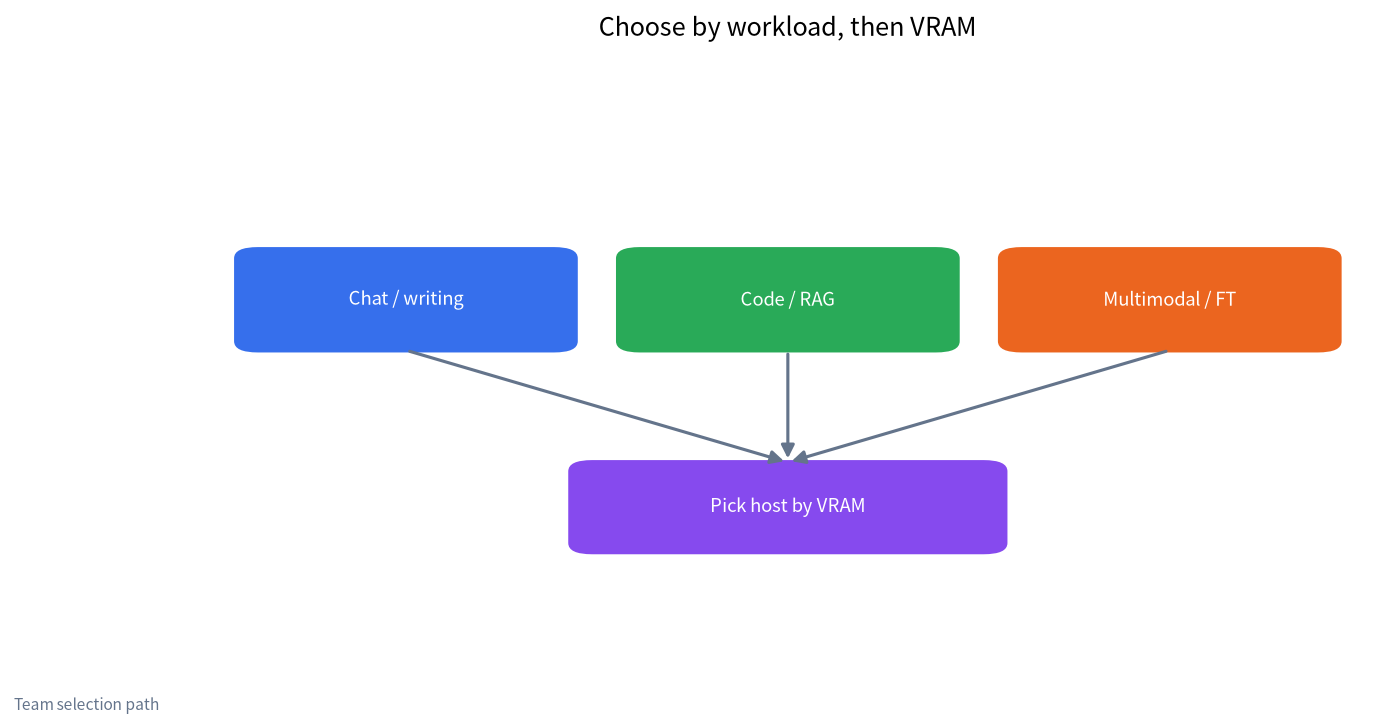
What usually blocks “run a large model on my computer” is not the CPU SKU—it is VRAM and disk. Chat and short writing often fit in 7B–14B quantized; local RAG and coding assistants prefer 14B–32B; multimodal stacks and long agent loops inflate KV cache. A practical order:
- Write down three tasks you will actually do each week.
- Decide whether you need offline use and whether data is sensitive (local privacy).
- Map tasks to a VRAM band, then choose host shape (desktop / mini PC / laptop + eGPU).
- Only then pick a specific GPU and chassis.
| Workload | Comfortable quantized class | VRAM band | Build tier |
|---|---|---|---|
| Chat, translation, short writing | 7B–14B | 8–12GB | Entry |
| Coding assistant, medium RAG | 14B–32B | 16–24GB | Main |
| 70B-class, long context, fine-tuning | 32B–70B / LoRA | 48GB+ | Heavy or rent |
For “how big on a 4090” see RTX 4090 max model size. Training-oriented PCs: AI LLM training PC config.
Three budget builds we actually recommend
These are budget-build references, not the only valid bills of materials. Prices are snapshot estimates. Size the PSU with headroom above GPU TDP; check motherboard and case compatibility before buying.
Build 1 — Entry host (~CNY 6,500 class)
For first-time local setup with Ollama or LM Studio, a couple of hours a day.
| Part | Reference | Notes |
|---|---|---|
| CPU | Recent 6–8 core desktop | Do not overspend on CPU |
| RAM | 32GB | Under 32GB gets tight with browser + model |
| GPU | RTX 3060 12GB or similar 8–12GB | Vet used cards (used GPU guide) |
| SSD | 1TB NVMe | Models fill disks fast (storage guide) |
| PSU | 550–650W bronze+ | Leave upgrade room |
Comfort zone is roughly 7B–12B quantized. Forcing 32B may need aggressive quant or CPU offload and will feel slow (why GPUs beat CPUs).
Build 2 — Main 24GB (~CNY 14,500 class)
This is the sweet spot we mention most often for a personal or small-team local LLM PC: one 24GB consumer card covers most day-to-day inference.
| Part | Reference | Notes |
|---|---|---|
| CPU | 8+ cores | Helps when vector DB + browser share the box |
| RAM | 64GB | More headroom for RAG multi-process |
| GPU | 24GB class | Prices swing—cross-check cheap GPU list |
| SSD | 2TB NVMe | Several 20–40GB weights coexist more easily |
| PSU | 750–850W | Follow GPU vendor guidance |
Detailed 24GB builds: budget 24GB GPU build. Tighter budgets: budget entry build.
Build 3 — Heavy dual-GPU / workstation (~CNY 32,000+)
For frequent 70B quantized runs, longer context, or light LoRA. You can also keep a 24GB local box and rent larger GPUs on demand (rent vs buy).
| Part | Reference | Notes |
|---|---|---|
| Platform | Dual-slot capable board | Watch power delivery and airflow |
| RAM | 128GB+ | Multi-service stacks stay calmer |
| GPU | 48GB+ single or 24GB×2 | Dual-GPU support varies by stack |
| SSD | 4TB+ NVMe or RAID | Separate weights from datasets |
| PSU | 1000W+ gold | Size for dual-GPU peaks |
Mini host vs desktop vs laptop
A “local LLM host” is not always a tower:
| Form factor | Pros | Cons | Best for |
|---|---|---|---|
| DIY desktop | Easy GPU swaps, cooling headroom | Size, DIY troubleshooting | People willing to wrench |
| Mini PC / barebone | Quiet, efficient, tidy | Low GPU ceiling, costly upgrades | Always-on office inference |
| Gaming laptop | Portable | Thermals and power limits | Demos on the road |
| Laptop + eGPU | Expandable | Interface/bandwidth loss | Strong laptop already (eGPU guide) |
Prefer GUIs: Windows install without CLI. Prefer Ollama: Ollama install guide. Newer engine overview: Strata explained.
“LLM server config” vs a heavy personal workstation
Calling a heavy desktop a “server” confuses buyers. Datacenter-style LLM server configs add ECC memory, out-of-band management, redundant PSUs, rack cooling, and on-call process—enterprise procurement, not a home budget trio. For organizations see enterprise private LLM deployment and private training & deployment. A heavy personal box is a strong workstation with no SLA.
Power, cooling, and case fit
VRAM sets the ceiling; daily happiness often fails on three details. First, PSU wattage: take the GPU recommendation and add 150–200W rather than “barely enough,” especially if you add drives later. Second, cooling: thick 24GB+ cards throttle in weak airflow, which shows up as “slower in the afternoon.” Third, case clearance: measure card length and thickness before purchase. None of this changes the three-tier map, but it decides whether you enjoy turning the machine on every day.
If your room is noise-sensitive, prefer a lower-power entry or mini host and burst heavy jobs on rented GPUs. Splitting “low load every day” from “high load occasionally” often beats an always-underused flagship card.
Example shopping paths (illustrative)
These paths are narratives, not endorsements of specific SKUs. Prices move weekly; treat them as decision templates.
Path A — “I just want chat offline tonight.” Buy or reuse an 8–12GB card, install a GUI app, pull one 7B–8B quantized model, and stop. Do not open ten model pages. Your bottleneck is learning the loop (download → load → prompt), not squeezing a 70B file onto a laptop. After a week of real use, revisit whether RAG or coding assistants appear in your top three tasks; only then spend on 24GB.
Path B — “Our three-person team needs a shared box on the office LAN.” Prefer the main 24GB tier with 64GB system RAM, wired Ethernet, and a UPS if blackouts are common. Put the model weights on a dedicated NVMe. Add a simple reverse-proxy and authentication before you expose anything beyond the desk switch. The hardware is only half of a “team host”; access control and logging are the other half (enterprise private deployment).
Path C — “I fine-tune on weekends and infer on weekdays.” Keep weekday inference on a local 24GB machine and rent a larger GPU for weekend LoRA jobs. That hybrid pattern avoids paying depreciation on a 48GB+ card that sits idle five days a week. Wire your dataset and eval scripts so renting does not mean rebuilding the project every time (LoRA VRAM notes).
Disk layout that survives real use
A surprisingly common failure mode is a fast GPU paired with a nearly full boot drive. Keep a simple layout: OS and apps on one NVMe; model weights on a second NVMe; datasets and exports on a third volume or external drive if you fine-tune. Leave at least 20–30% free on the weights disk so downloads and temp merges do not stall. If you only own one drive today, start with 2TB and plan the split before you accumulate five 40GB files “just to compare.”
Networking and sharing without turning the PC into an accidental server
Many people enable LAN sharing on day one. That is fine on a trusted home network; it is risky on a flat office VLAN. Minimum hygiene: bind the API to a private interface, require a token, keep the OS patched, and do not port-forward the LLM port to the public internet “for convenience.” If multiple colleagues need access, prefer a dedicated small host and written access rules over a gaming PC under someone’s desk.
When to stop upgrading hardware
Upgrade when a concrete task fails (context too short, batch too slow, model will not load). Do not upgrade because a social media post showed a bigger GPU. Measure tokens per second on your prompts, note whether the model is GPU-bound or IO-bound, and only then spend. Our rent vs buy and GPU price timing pieces exist so you can wait out bad price weeks.
Pre-purchase checklist
- Match VRAM to the target model with the VRAM calculator.
- Leave disk for two or three resident weights, not “exactly one download.”
- Confirm PSU connectors and case length/thickness.
- Decide acceptable noise and power draw for all-day use.
- Pick a software path (Ollama, LM Studio, llama.cpp, or Strata) before the hardware arrives.
Quantization choices that change the shopping list
People often fixate on “70B” and ignore quantization. A 70B Q2 may load where a 32B Q6 will not, yet answer quality and occasional broken generations can disappoint. For daily writing and coding, many users are happier with a smaller model at a higher-quality quant than a maximum-size file at an aggressive quant. That preference feeds back into hardware: a stable 24GB main build running a strong 14B–32B quant can beat a stressed entry laptop that barely holds a 70B Q2. Re-read the VRAM tables with quality in mind, not only “will it fit.”
Software checklist beside the parts list
Hardware without a planned stack wastes evenings. Decide whether you want a one-click GUI (LM Studio-style), a CLI-friendly daemon (Ollama-style), or a higher-throughput server (vLLM-style on Linux). Confirm your OS drivers: NVIDIA on Windows and Linux are the most documented path for newcomers; AMD and Intel paths work but have different sharp edges (AMD GPU local LLM, Intel GPU/NPU). Create a folder convention for models before the first download so you do not scatter 100GB across Desktop and Downloads.
Common mistakes
- Counting parameters without counting quantization quality.
- Buying far less system RAM than VRAM when you rely on CPU offload (RAM vs VRAM).
- Treating marketing “AI PC” NPU claims as 70B inference capacity (Intel GPU/NPU).
- Ignoring licenses: downloadable ≠ commercially cleared.
What we verified—and what we did not
Prices are snapshot estimates; VRAM bands are public quantization heuristics, not lab scoreboards. We did not run long-haul reliability tests on a specific mini-PC brand and we do not sell hardware. Recheck street prices and compatibility lists before you order.
A three-day validation instead of a three-month fantasy
Long guides still leave people unsure what to do on Monday morning. Replace fantasy roadmaps with a three-day validation: day one ends with a successful install and one real conversation; day two runs ten authentic tasks and logs failure modes; day three decides whether to add retrieval, change model size, or simply improve prompts. Hardware purchases and fine-tuning plans should follow evidence, not anxiety.
If the same failure repeats—tables break, citations point at the wrong paragraph—fix the process for that failure class before you buy a more expensive GPU. Table issues may need stricter output constraints or post-processing; citation issues usually need chunking and retrieval work. A tiny spreadsheet of failure classes is already a cheap evaluation set.
Extra verification and reading order
Read this article beside the VRAM, budget-build, and private-deployment guides: confirm workload and VRAM first, then tools and models, and only then training or enterprise governance. Keep key prompts, weight filenames, and eval notes in one place so a two-week retrospective beats a folder of unread bookmarks. If your environment has special compliance rules, follow legal and security counsel; this page is technical education.
The lasting value of local deployment is rarely a single successful demo. It is repeatability, rollback, and explainability. Whether you choose free tools or an enterprise path, keep a change log: which weight changed on which day, who approved an adapter merge, which eval failed. That log makes the next incident an order of magnitude cheaper. If you still do not know where to start, write three real tasks first, then return to the VRAM and build tables as a multiple-choice problem instead of buying hardware on impulse.
FAQ
What local LLM PC should beginners buy first?
If budget is tight and tasks are chat/short writing, start with an 8–12GB entry host, learn the workflow, then decide whether to move to 24GB.
What are the three builds you recommend most?
Entry (8–12GB), main (24GB), and heavy (48GB+ or dual-GPU/rent). Most individuals are fine stopping at the second.
Can a mini PC be a local LLM host?
Yes for quiet always-on inference; be conservative on model size because upgrades are limited.
Is 24GB enough for a small-team “LLM server”?
Enough for intranet inference and RAG pilots. High availability, access control, and backups still need an enterprise design—not just a consumer GPU.
Should I jump straight to a 4090?
Only if you truly need the VRAM/speed and you use it hard every day. Otherwise run the rent-vs-buy math; occasional heavy jobs often favor renting.
Does CPU matter for running local LLMs?
Yes, but it is rarely the first bottleneck. Prioritize VRAM, system RAM, and NVMe; the CPU handles scheduling, tokenization, and some offload.
Want a second opinion on your parts list?
Post in the community or email admin@microaione.com with budget, offline needs, and main tasks (chat / code / RAG / fine-tune). Our Shenzhen team can map you to a VRAM band and label every estimate clearly.
Sources: NVIDIA GeForce product pages, Ollama model library, our local LLM PC build configs, cheap GPUs for LLMs.